EmbLogic's Blog

MDC using IPC

RCS file: sender.c,v
Working file: sender.c
head: 1.7
branch:
locks: strict
akshat: 1.7
access list:
symbolic names:
keyword substitution: kv
total revisions: 7;    selected revisions: 7
description:
MDC using IPC.
In this project msg send to other process will be encrypted.
It will be decrypted at other side with the help of master array.
Master array formed is passed sucessfully to other side.
now encrypted data will be passed in msg queue.
—————————-
revision 1.7    locked by: akshat;
date: 2014/04/11 18:45:43;  author: akshat;  state: Exp;  lines: +4 -6
Msgs are recieved in regular fashion, appending the process.
—————————-
revision 1.6
date: 2014/04/11 18:15:48;  author: akshat;  state: Exp;  lines: +14 -9
Decompression is proper at other side now.
removing the excess byte recieved at other side.
—————————-
revision 1.5
date: 2014/04/11 15:18:32;  author: akshat;  state: Exp;  lines: +1 -1
going forward in the approach.
—————————-
revision 1.4
date: 2014/04/11 15:16:08;  author: akshat;  state: Exp;  lines: +3 -2
3 4 characters are not yet recieved there.
looking for the right approach.
will append this project in live chat btw 2 terminals.
—————————-
revision 1.3
date: 2014/04/11 14:59:35;  author: akshat;  state: Exp;  lines: +7 -4
Sender is able to send the encrypted bytes, but these are not recieved at other side.
ipcs command is showing that msgs are  present in queue.
—————————-
revision 1.2
date: 2014/04/11 07:07:46;  author: akshat;  state: Exp;  lines: +1 -1
Now trying to pass the compressed file in queue.
—————————-
revision 1.1
date: 2014/04/11 07:00:21;  author: akshat;  state: Exp;
Initial revision
=============================================================================

Posted in Project 03: Client Server Communication using Linux and IPC, Project 2: Multiple Data Compression and Encryption | Leave a comment

program to print * using while loop in shell scripting

1 head 1.1;
2 access;
3 symbols;
4 locks
5 root:1.1; strict;
6 comment @# @;
7
8
9 1.1
10 date 2014.04.19.12.26.46; author root; state Exp;
11 branches;
12 next ;
13
14
15 desc
16 @to print * using while loop in shells scripting .
17 @
18
19
20 1.1
21 log
22 @Initial revision
23 @
– INSERT —

Posted in Uncategorized | Leave a comment

program to print * using while loop in shell scripting

1 head    1.1;
2 access;
3 symbols;
4 locks
5         root:1.1; strict;
6 comment @# @;
7
8
9 1.1
10 date    2014.04.19.12.26.46;    author root;    state Exp;
11 branches;
12 next    ;
13
14
15 desc
16 @to print * using while loop in shells scripting .
17 @
18
19
20 1.1
21 log
22 @Initial revision
23 @
– INSERT –

Posted in Uncategorized | Leave a comment

Difference in malloc,vmalloc,kmalloc

Malloc :-

It is presnt in C library. It allocates memory in user space

Vmalloc:-

It is shared object. If used in user space act as malloc. If used in kernel space then act as kmalloc.

Kmalloc:-

It allocates the space in kernel space.It is in symbol table of kernel.The memory is allocated in form of 4k pages(4096 bytes ).

Posted in Uncategorized | Leave a comment

Introduction to Tool Chain

When talking about toolchains, one must distinguish three different machines :

  • the build machine, on which the toolchain is built
  • the host machine, on which the toolchain is executed
  • the target machine, for which the toolchain generates code

From these three different machines, we distinguish four different types of toolchain building processes :

  • A native toolchain, as can be found in normal Linux distributions, has usually been compiled on x86, runs on x86 and generates code for x86.
  • A cross-compilation toolchain, which is the most interesting toolchain type for embedded development, is typically compiled on x86, runs on x86 and generates code for the target architecture (be it ARM, MIPS, PowerPC or any other architecture supported by the different toolchain components)
  • A cross-native toolchain, is a toolchain that has been built on x86, but runs on your target architecture and generates code for your target architecture. It’s typically needed when you want a native gcc on your target platform, without building it on your target platform.
  • A canadian build is the process of building a toolchain on machine A, so that it runs on machine B and generates code for machine C. It’s usually not really necessary.
Posted in Uncategorized | Leave a comment

Shared Memory

What is Shared Memory?

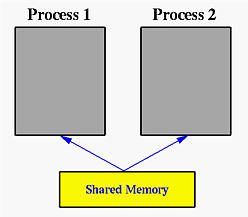
In the discussion of the fork() system call, we mentioned that a parent and its children have separate address spaces. While this would provide a more secured way of executing parent and children processes (because they will not interfere each other), they shared nothing and have no way to communicate with each other. A shared memory is an extra piece of memory that is attached to some address spaces for their owners to use. As a result, all of these processes share the same memory segment and have access to it. Consequently, race conditions may occur if memory accesses are not handled properly. The following figure shows two processes and their address spaces. The yellow rectangle is a shared memory attached to both address spaces and both process 1 and process 2 can have access to this shared memory as if the shared memory is part of its own address space. In some sense, the original address spaces is “extended” by attaching this shared memory.


Shared memory is a feature supported by UNIX System V, including Linux, SunOS and Solaris. One process must explicitly ask for an area, using a key, to be shared by other processes. This process will be called the server. All other processes, the clients, that know the shared area can access it. However, there is no protection to a shared memory and any process that knows it can access it freely. To protect a shared memory from being accessed at the same time by several processes, a synchronization protocol must be setup.

A shared memory segment is identified by a unique integer, the shared memory ID. The shared memory itself is described by a structure of type shmid_ds in header file sys/shm.h. To use this file, files sys/types.h and sys/ipc.h must be included. Therefore, your program should start with the following lines:

#include  <sys/types.h>
#include  <sys/ipc.h>
#include  <sys/shm.h>

A general scheme of using shared memory is the following:

  • For a server, it should be started before any client. The server should perform the following tasks:
    1. Ask for a shared memory with a memory key and memorize the returned shared memory ID. This is performed by system call shmget().
    2. Attach this shared memory to the server’s address space with system call shmat().
    3. Initialize the shared memory, if necessary.
    4. Do something and wait for all clients’ completion.
    5. Detach the shared memory with system call shmdt().
    6. Remove the shared memory with system call shmctl().
  • For the client part, the procedure is almost the same:
    1. Ask for a shared memory with the same memory key and memorize the returned shared memory ID.
    2. Attach this shared memory to the client’s address space.
    3. Use the memory.
    4. Detach all shared memory segments, if necessary.
    5. Exit.


Posted in Uncategorized | Leave a comment

basic concepts

we can exit from superuser by using exit command .
exit
changing the password of root
passwd

Posted in Uncategorized | Leave a comment

Introduction to cross-compiling for Linux

Host vs Target

A compiler is a program that turns source code into executable code. Like all programs, a compiler runs on a specific type of computer, and the new programs it outputs also run on a specific type of computer.[1]

The computer the compiler runs on is called the host, and the computer the new programs run on is called the target. When the host and target are the same type of machine, the compiler is a native compiler. When the host and target are different, the compiler is a cross compiler.[2]
Why cross-compile?

In theory, a PC user who wanted to build programs for some device could get the appropriate target hardware (or emulator), boot a Linux distro on that, and compile natively within that environment. While this is a valid approach (and possibly even a good idea when dealing with something like a Mac Mini), it has a few prominent downsides for things like a linksys router or iPod:

Speed – Target platforms are usually much slower than hosts, by an order of magnitude or more. Most special-purpose embedded hardware is designed for low cost and low power consumption, not high performance. Modern emulators (like qemu) are actually faster than a lot of the real world hardware they emulate, by virtue of running on high-powered desktop hardware.[3]

Capability – Compiling is very resource-intensive. The target platform usually doesn’t have gigabytes of memory and hundreds of gigabytes of disk space the way a desktop does; it may not even have the resources to build “hello world”, let alone large and complicated packages.

Availability – Bringing Linux up on a hardware platform it’s never run on before requires a cross-compiler. Even on long-established platforms like Arm or Mips, finding an up-to-date full-featured prebuilt native environment for a given target can be hard. If the platform in question isn’t normally used as a development workstation, there may not be a recent prebuilt distro readily available for it, and if there is it’s probably out of date. If you have to build your own distro for the target before you can build on the target, you’re back to cross-compiling anyway.

Flexibility – A fully capable Linux distribution consists of hundreds of packages, but a cross-compile environment can depend on the host’s existing distro from most things. Cross compiling focuses on building the target packages to be deployed, not spending time getting build-only prerequisites working on the target system.

Convenience – The user interface of headless boxes tends to be a bit crampled. Diagnosing build breaks is frustrating enough as it is. Installing from CD onto a machine that hasn’t got a CD-ROM drive is a pain. Rebooting back and forth between your test environment and your development environment gets old fast, and it’s nice to be able to recover from accidentally lobotomizing your test system.

Why is cross-compiling hard?
Portable native compiling is hard.

Most programs are developed on x86 hardware, where they are compiled natively. This means cross-compiling runs into two types of problems: problems with the programs themselves and problems with the build system.

The first type of problem affects all non-x86 targets, both for native and for cross-builds. Most programs make assumptions about the type of machine they run on, which must match the platform in question or the program won’t work. Common assumptions include:

Word size – Copying a pointer into an int may lose data on a 64 bit platform, and determining the size of a malloc by multiplying by 4 instead of sizeof(long) isn’t good either. Subtle security flaws due to integer overflows are also possible, ala “if (x+y < size) memset(src+x,0,y);”, which results in a 4 gigabyte memset on 32-bit hardware when x=1000 and y=0xFFFFFFF0…

Endianness – Different systems store binary data iternally in different ways, which means that block-reading int or float data from disk or the network may need translation. Type “man byteorder” for details.

Alignment – Some platforms (such as arm) can only read or write ints from addresses that are an even multiple of 4 bytes, otherwise they segfault. Even the ones that can handle arbitrary alignments are slower dealing with unaligned data (they have to fetch twice to get both halves), so the compiler will often pad structures to align variables. Treating structures as a lump of data that can be sent to disk or across the network thus requires extra work to ensure a consistent representation.

Default signedness – Whether the “char” data type defaults to signed or unsigned varies from platform to platform (and in some cases from compiler to compiler), which can cause some really surprising bugs. The easy workaround for this is to provide a compiler argument like “-funsigned-char” to force the default to a known value.

NOMMU – If your target platform doesn’t have a memory management unit, several things need to change. You need vfork() instead of fork(), only certain types of mmap() work (shared or read only, but not copy on write), and the stack doesn’t grow dynamically.

Most packages aim to be portable when compiled natively, and will at least accept patches to fix any of the above problems (with the possible exception of NOMMU issues) submitted to the appropriate development mailing list.

Posted in Project 9: Embedded Linux on ARM | Leave a comment

CROSS COMPILATION VS NATIVE COMPILATION

By default, Linux builds for the same architecture the host system is running. This is called “native compiling”. An x86 system building an x86 kernel, x86-64 building x86-64, or powerpc building powerpc are all examples of native compiling.

Building different binaries than the host runs is called cross compiling. Cross compiling is hard. The build system for the Linux kernel supports cross compiling via a two step process: 1) Specify a different architecture (ARCH) during the configure, make, and install stages. 2) Supply a cross compiler (CROSS_COMPILE) which can output the correct kind of binary code. An example cross compile command line (building the “arm” architecture) looks like:

make ARCH=arm menuconfig
make ARCH=arm CROSS_COMPILE=armv5l-

To specify a different architecture than the host, either define the “ARCH” environment variable or else add “ARCH=xxx” to the make command line for each of the make config, make, and make install stages. The acceptable values for ARCH are the names of the directories in the “arch” subdirectory of the Linux kernel source code, see Architectures for details. All stages of the build must use the same ARCH value, and building a second architecture in the same source directory requires “make distclean”. (Just “make clean” isn’t sufficient, things like the include/asm symlink need to be removed and recreated.)

To specify a cross compiler prefix, define the CROSS_COMPILE environment variable (or add CROSS_COMPILE= to each make command line). Native compiler tools, which output code aimed at the environment they’re running in, usually have a simple name (“gcc”, “ld”, “strip”). Cross compilers usually add a prefix to the name of each tool, indicating the target they produce code for. To tell the Linux kernel build to use a cross compiler named “armv4l-gcc” (and corresponding “armv4l-ld” and “armv4l-strip”) specify “CROSS_COMPILE=armv4l-”. (Prefixes ending in a dash are common, and forgetting the trailing dash in CROSS_COMPILE is a common mistake.

Posted in Uncategorized | Leave a comment

Shell ,Terminal and Console

SHELL :->

“Shell” is the term used for any program which runs others. It wraps around another program .As the name suggest “Shell” the outer covering .for example in windows(OS) windows explorer is shell.In unix circles, shell has specialized to mean a command-line shell, centered around entering the name of the application one wants to start, followed by the names of files or other objects that the application should act on, and pressing the Enter key. launching programs in the background and managing them is mostly performed by the shell.

TERMINAL :- )

The word terminal can also have a more traditional meaning of a device through which one interacts with a computer, typically with a keyboard and display. In General ,we can say that end point communication with the usera special-purpose computer whose only purpose is to drive a keyboard, display, mouse and occasionally other human interaction peripherals, with the actual applications running on another, more powerful computer.

CONSOLE : – )

The console is a special sort of terminal. Historically, the console was a single keyboard and monitor plugged into a dedicated serial console port on a computer used for direct communication at a low level with the operating system. Modern linux systems provide virtual consoles. These are accessed through key combinations (e.g. Alt+F1 or Ctrl+Alt+F1; the function keys  numbers different consoles) which are handled at low levels of the linux operating system — this means that there is no special service which needs to be installed and configured to run. Interacting with the console is also done using a shell program.

note:

1)Input:the terminal converts keys into control sequences (e.g. Left ? \e[D). The shell converts control sequences into commands (e.g. \e[D ? backward-char).

2)Line edition, input history and completion are provided by the shell. The terminal may provide its own line edition, history and completion instead, and only send a line to the shell when it’s ready to be executed.

3Output: the shell emits instructions such as “display foo”, “switch the foreground color to green”, “move the cursor to the next line”, etc. The terminal acts on these instructions.

Posted in Uncategorized | Leave a comment

C – Struct memory allocation

Do you know how memory is allocated for structure members in C

Always, contiguous(adjacent) memory locations are used to store structure members in memory. Consider below example to understand how memory is allocated for structures.

Example program for memory allocation in C structure

#include <stdio.h>
#include <string.h>
struct student
{
       int id1;
       int id2;
       char a;
       char b;
       float percentage;
};
int main()
{
    int i;
    struct student record1 = {1, 2, ‘A’, ‘B’, 90.5};
    printf(“size of structure in bytes : %d\n”,
                           sizeof(record1));
    printf(“\nAddress of id1        = %u”, &record1.id1 );
    printf(“\nAddress of id2        = %u”, &record1.id2 );
    printf(“\nAddress of a          = %u”, &record1.a );
    printf(“\nAddress of b          = %u”, &record1.b );
    printf(“\nAddress of percentage = %u”,&record1.percentage);
    return 0;
}

 Output:

size of structure in bytes : 16Address of id1 = 675376768
Address of id2 = 675376772
Address of a = 675376776
Address of b = 675376777
Address of percentage = 675376780

           There are 5 members declared for structure in above program. In 32 bit compiler, 4 bytes of memory is occupied by int datatype. 1 byte of memory is occupied by char datatype and 4 bytes of memory is occupied by float datatype.

Please refer below table to know from where to where memory is allocated for each datatype in contiguous (adjacent) location in memory.

Datatype Memory allocation in C (32 bit compiler)
From Address To Address Total bytes         
int id1 675376768 675376771 4
int id2 675376772 675376775 4
char a 675376776 1
char b 675376777 1
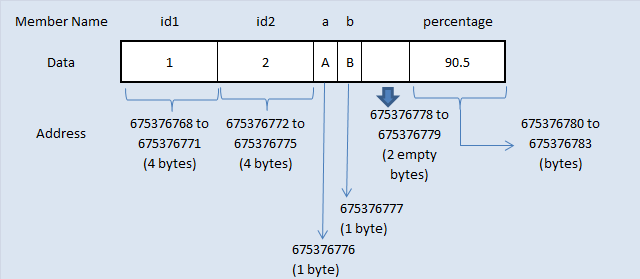
Addresses 675376778 and 675376779 are left empty
(Do you know why? Please see Structure padding topic below)
2
float percentage 675376780 675376783 4

           The pictorial representation of above structure memory allocation is given below. This diagram will help you to understand the memory allocation concept in C very easily.

C structure members storage in memory

Posted in Uncategorized | Leave a comment

Cross Compiler

When you develop a desktop or server application, almost always the development platform (the machine that runs your compiler) and the target platform (the machine that runs your application) are the same. By “platform” I mean the combination of CPU architecture, and Operating System. The process of building executable binaries on one machine, and run them on another machine when the CPU architecture or the Operating System are different is called “cross compilation”. A special compiler is needed for doing cross compilation that is called “cross compiler“, and sometimes just “toolchain”.

For example, desktop PC application developers for Windows or Linux can build and run their binaries on the very same machine. Even developers of server applications generally have the same basic architecture and Operating System on both their development machine and server machine. The compiler used in these cases is called “native compiler”.

On the other hand, developers of an embedded Linux application that runs on a non PC architecture (like ARM, PowerPC, MIPS, etc.) tend to use a cross compiler to generate executable binaries from source code. The cross compiler must be specifically tailored for doing cross compilation from the development machine’s architecture (sometimes called “host”), to the embedded machine’s architecture (called “target”).

Note: cross compilation is only needed when generating binary executables from source code written in a compiled language, like C or C++. Programs written in interpreted language, like Perl, Python, PHP, or JavaScript, do not need a cross compiler. In most cases interpreted programs should be able run unchanged on any target. You do need, however, a suitable interpreter running on the target machine.

Posted in Uncategorized | Leave a comment

linux booting process.

booting process.

1.BIOS(Basic Input/Output System)

2.MBR(Master Boot Record)

3.LILO or GRUB

LILO:-LInux LOader

GRUB:-GRand Unified Bootloader

4.Kernel

5.init

6.Run Levels

1.BIOS:

i.When we power on BIOS performs a Power-On Self-Test (POST) for all of the different hardware components in the system to make sure everything is working properly

ii.Also it checks for whether the computer is being started from an off position (cold boot) or from a restart (warm boot) is
stored at this location.

iii.Retrieves information from CMOS (Complementary Metal-Oxide Semiconductor) a battery operated memory chip on the motherboard that stores time, date, and critical system information.

iv.Once BIOS sees everything is fine it will begin searching for an operating system Boot Sector on a valid master boot sector
on all available drives like hard disks,CD-ROM drive etc.

v.Once BIOS finds a valid MBR it will give the instructions to boot and executes the first 512-byte boot sector that is the first
sector (“Sector 0?) of a partitioned data storage device such as hard disk or CD-ROM etc .

2.MBR

i. Normally we use multi-level boot loader.Here MBR means I am referencing to DOS MBR.

ii.Afer BIOS executes a valid DOS MBR,the DOS MBR will search for a valid primary partition marked as bootable on the hard disk.

iii.If MBR finds a valid bootable primary partition then it executes the first 512-bytes of that partition which is second level MBR.

iv. In linux we have two types of the above mentioned second level MBR known as LILO and GRUB

3.LILO

i.LILO is a linux boot loader which is too big to fit into single sector of 512-bytes.

ii.So it is divided into two parts :an installer and a runtime module.

iii.The installer module places the runtime module on MBR.The runtime module has the info about all operating systems installed.

iv.When the runtime module is executed it selects the operating system to load and transfers the control to kernel.

v.LILO does not understand filesystems and boot images to be loaded and treats them as raw disk offsets

GRUB

i.GRUB MBR consists of 446 bytes of primary bootloader code and 64 bytes of the partition table.

ii.GRUB locates all the operating systems installed and gives a GUI to select the operating system need to be loaded.

iii.Once user selects the operating system GRUB will pass control to the karnel of that operating system.
see below what is the difference between LILO and GRUB

4.Kernel

i.Once GRUB or LILO transfers the control to Kernel,the Kernels does the following tasks

Intitialises devices and loads initrd module
mounts root filesystem

5.Init

i.The kernel, once it is loaded, finds init in sbin(/sbin/init) and executes it.

ii.Hence the first process which is started in linux is init process.

iii.This init process reads /etc/inittab file and sets the path, starts swapping, checks the file systems, and so on.

iv.It runs all the boot scripts(/etc/rc.d/*,/etc/rc.boot/*)

v.starts the system on specified run level in the file /etc/inittab

6.Runlevel

i.There are 7 run levels in which the linux OS runs and different run levels serves for different purpose.The descriptions are
given below.

0 – halt
1 – Single user mode
2 – Multiuser, without NFS (The same as 3, if you don’t have networking)
3 – Full multiuser mode
4 – unused
5 – X11
6 – Reboot

ii.We can set in which runlevel we want to run our operating system by defining it on /etc/inittab file.

Now as per our setting in /etc/inittab the Operating System the operating system boots up and finishes the bootup process.

Below are given some few important differences about LILO and GRUB
LILO

GRUB
LILO has no interactive command interface GRUB has interactive command interface
LILO does not support booting from a network GRUB does support booting from a network
If you change your LILO config file, you have to rewrite the LILO stage one boot loader to the MBR GRUB automatically detects any change in config file and auto loads the OS
LILO supports only linux operating system GRUB supports large number of OS


Posted in Uncategorized | Leave a comment

shell script using while loop

2 RCS file: shel4,v
3 Working file: shel4
4 head: 1.1
5 branch:
6 locks: strict
7         root: 1.1
8 access list:
9 symbolic names:
10 keyword substitution: kv
11 total revisions: 1;     selected revisions: 1
12 description:
13 program of shell script using while loop
14 used to print *
15 —————————-
16 revision 1.1    locked by: root;
17 date: 2014/04/15 12:33:54;  author: root;  state: Exp;
18 Initial revision
19 ============================================================================    =
20
21 RCS file: shel4,v
22 Working file: shel4
“shell” 38L, 914C                                             1,0-1         Top
——————————————————————————————————————————–

Posted in Uncategorized | Leave a comment

working on shell scripting

RCS file: scripting1.sh,v
3 Working file: scripting1.sh
4 head:
5 branch:
6 locks: strict
7 access list:
8 symbolic names:
9 keyword substitution: kv
10 total revisions: 0
11 description:
12 scripting
13 printing value using “echo”
14 ============================================================================

RCS file: scripting2.sh,v
3 Working file: scripting2.sh
4 head:
5 branch:
6 locks: strict
7 access list:
8 symbolic names:
9 keyword substitution: kv
10 total revisions: 0
11 description:
12 Scripting
13 using command unset to remove the assigned value
14 ============================================================================ RCS file: scripting3.sh,v
3 Working file: scripting3.sh
4 head:
5 branch:
6 locks: strict
7 access list:
8 symbolic names:
9 keyword substitution: kv
10 total revisions: 0
11 description:
12 scripting
13 printing the words in same line using “-n”
14 ============================================================================

RCS file: scripting5.sh,v
3 Working file: scripting5.sh
4 head:
5 branch:
6 locks: strict
7 access list:
8 symbolic names:
9 keyword substitution: kv
10 total revisions: 0
11 description:
12 using else if in script
13 ============================================================================

RCS file: scripting6.sh,v
3 Working file: scripting6.sh
4 head:
5 branch:
6 locks: strict
7 access list:
8 symbolic names:
9 keyword substitution: kv
10 total revisions: 0
11 description:
12 using case in script
13 ============================================================================

RCS file: scripting8.sh,v
3 Working file: scripting8.sh
4 head:
5 branch:
6 locks: strict
7 access list:
8 symbolic names:
9 keyword substitution: kv
10 total revisions: 0
11 description:
12 using for loop in script
13 ============================================================================

RCS file: scripting11.sh,v
3 Working file: scripting11.sh
4 head:
5 branch:
6 locks: strict
7 access list:
8 symbolic names:
9 keyword substitution: kv
10 total revisions: 0
11 description:
12 using while loop and `expr` in script
13 ============================================================================

Posted in Shell Scripts | Leave a comment