EmbLogic's Blog

ipc server using fifo

#include”header.h”
#include”declaration.h”

int main()
{
int r1,p1,ret,len;
struct req res;
ret=access(“rq1″,F_OK);
if(ret <0)
{
ret=mkfifo(“rq1″,0777);
if(ret<0)
{
perror(“mkfifo”);
return -1;
}
}
ret=access(“rq2″,F_OK);
if(ret <0)
{
ret=mkfifo(“rq2″,0777);
if(ret<0)
{
perror(“mkfifo”);
return -1;
}
}
ret=access(“rq3″,F_OK);
if(ret <0)
{
ret=mkfifo(“rq3″,0777);
if(ret<0)
{
perror(“mkfifo”);
return -1;
}
}
ret=access(“pq1″,F_OK);
if(ret <0)
{
ret=mkfifo(“pq1″,0777);
if(ret<0)
{
perror(“mkfifo”);
return -1;
}
}
ret=access(“pq2″,F_OK);
if(ret <0)
{
ret=mkfifo(“pq2″,0777);
if(ret<0)
{
perror(“mkfifo”);
return -1;
}
}
ret=access(“pq3″,F_OK);
if(ret <0)
{
ret=mkfifo(“pq3″,0777);
if(ret<0)
{
perror(“mkfifo”);
return -1;
}
}
/////1st requesting client//////////////////
r1=open(“rq1″,O_RDONLY);
len=sizeof(struct req);
ret=read(r1,&res,len);

printf(“res.a=%d\nres.b=%d\nres.opr=%c\n”,res.a,res.b,res.opr);
///////1st processing client/////////////////
p1=open(“pq1″,O_WRONLY);
write(p1,&res,len);
close(p1);
p1=open(“pq1″,O_RDONLY);
read(p1,&res,len);
printf(“at server sum is = %d\n”,res.result);
close(r1);
r1=open(“rq1″,O_WRONLY);
write(r1,&res,len);
/////2nd requesting client//////////////////
close(r1);
r1=open(“rq1″,O_RDONLY);
len=sizeof(struct req);
ret=read(r1,&res,len);
printf(“ret =%d\n”,ret);

printf(“res.a=%d\nres.b=%d\nres.opr=%c\n”,res.a,res.b,res.opr);

Posted in Uncategorized | Leave a comment

Socket

A socket is one end-point of a two-way communication link between two programs running on the network.

A server application normally listens to a specific port waiting for connection requests from a client. When a connection request arrives, the client and the server establish a dedicated connection over which they can communicate. During the connection process, the client is assigned a local port number, and binds a socket to it. The client talks to the server by writing to the socket and gets information from the server by reading from it. Similarly, the server gets a new local port number (it needs a new port number so that it can continue to listen for connection requests on the original port). The server also binds a socket to its local port and communicates with the client by reading from and writing to it.

The client and the server must agree on a protocol–that is, they must agree on the language of the information transferred back and forth through the socket.


Posted in Project 04: FTP based Client Server using Threads and Sockets, Uncategorized | Leave a comment

Character Driver (Insertion of DD and Registration of DD into the kernel)

#insert the device driver and get register in the kernel i.e get the major number with a register_chrdev which is in fs.h and get unregister using the unregister_chrdev.....:) :)
RCS file: init.c,v
Working file: init.c
head: 1.17
branch:
locks: strict
access list:
symbolic names:
keyword substitution: kv
total revisions: 17;	selected revisions: 17
description:
give the defination for the module_init its the entry point to the kernel.
----------------------------
revision 1.17
date: 2014/05/06 05:22:17;  author: root;  state: Exp;  lines: +1 -1
*** empty log message ***
----------------------------
revision 1.16
date: 2014/05/06 05:10:50;  author: root;  state: Exp;  lines: +10 -3
give the DEVNAME macro.
give the DEBUG macro.
----------------------------
revision 1.15
date: 2014/05/06 04:43:29;  author: root;  state: Exp;  lines: +3 -2
assingning MAJORNO= majorno inside the fuction.
----------------------------
revision 1.14
date: 2014/05/06 04:33:31;  author: root;  state: Exp;  lines: +1 -0
include the declaration.h header file in this
----------------------------
revision 1.13
date: 2014/05/06 04:22:00;  author: root;  state: Exp;  lines: +3 -3
assigning the Macro MAJORNO equal to extern majorno.
and dont use macro for process always use extern majono for process.
----------------------------
revision 1.12
date: 2014/05/06 04:11:54;  author: root;  state: Exp;  lines: +5 -3
use the MAJORNO macro and extern majorno
----------------------------
revision 1.11
date: 2014/05/06 00:56:34;  author: root;  state: Exp;  lines: +2 -2
*** empty log message ***
----------------------------
revision 1.10
date: 2014/05/05 23:54:45;  author: root;  state: Exp;  lines: +1 -1
*** empty log message ***
----------------------------
revision 1.9
date: 2014/05/05 23:15:56;  author: root;  state: Exp;  lines: +1 -1
*** empty log message ***
----------------------------
revision 1.8
date: 2014/05/05 23:14:10;  author: root;  state: Exp;  lines: +3 -3
*** empty log message ***
----------------------------
revision 1.7
date: 2014/05/05 23:10:24;  author: root;  state: Exp;  lines: +2 -2
*** empty log message ***
----------------------------
revision 1.6
date: 2014/05/05 22:59:35;  author: root;  state: Exp;  lines: +2 -2
*** empty log message ***
----------------------------
revision 1.5
date: 2014/05/05 22:47:21;  author: root;  state: Exp;  lines: +1 -1
*** empty log message ***
----------------------------
revision 1.4
date: 2014/05/05 22:29:55;  author: root;  state: Exp;  lines: +2 -1
not include the fileopr.h and define the fops of file_operations type in init.c file itself.
----------------------------
revision 1.3
date: 2014/05/05 22:17:16;  author: root;  state: Exp;  lines: +1 -0
include fileopr.h header file in the init.c
----------------------------
revision 1.2
date: 2014/05/05 22:13:57;  author: root;  state: Exp;  lines: +9 -0
this is the registration of the Device Driver into the kernel.
define register_chardev which is available in fs.h at 79%.
----------------------------
revision 1.1
date: 2014/05/04 03:49:15;  author: root;  state: Exp;
Initial revision
=============================================================================

RCS file: cleanup.c,v
Working file: cleanup.c
head: 1.7
branch:
locks: strict
access list:
symbolic names:
keyword substitution: kv
total revisions: 7;	selected revisions: 7
description:
give the defination for the module_exit.
----------------------------
revision 1.7
date: 2014/05/06 05:11:26;  author: root;  state: Exp;  lines: +3 -1
give the DEBUG and DEVNAME macro
----------------------------
revision 1.6
date: 2014/05/06 04:45:28;  author: root;  state: Exp;  lines: +1 -1
introduce ; in the unregister_chrdev
----------------------------
revision 1.5
date: 2014/05/06 04:33:48;  author: root;  state: Exp;  lines: +1 -0
include the declaration.h header file in this.
----------------------------
revision 1.4
date: 2014/05/06 04:12:37;  author: root;  state: Exp;  lines: +1 -0
define the function unregister_chrdev
----------------------------
revision 1.3
date: 2014/05/04 04:17:02;  author: root;  state: Exp;  lines: +1 -1
redeclaration of cleanup function.
----------------------------
revision 1.2
date: 2014/05/04 04:12:01;  author: root;  state: Exp;  lines: +1 -1
this is the cleanup
----------------------------
revision 1.1
date: 2014/05/04 03:49:15;  author: root;  state: Exp;
Initial revision
=============================================================================

RCS file: declaration.h,v
Working file: declaration.h
head: 1.1
branch:
locks: strict
access list:
symbolic names:
keyword substitution: kv
total revisions: 1;	selected revisions: 1
description:
extern the int majorno.
----------------------------
revision 1.1
date: 2014/05/06 04:11:34;  author: root;  state: Exp;
Initial revision
=============================================================================

RCS file: header.h,v
Working file: header.h
head: 1.4
branch:
locks: strict
access list:
symbolic names:
keyword substitution: kv
total revisions: 4;	selected revisions: 4
description:
this is the header file for the device driver.
including the init.h and module.h.
and MODULE_LICENSE for the GPL(gerneal purpose license)
----------------------------
revision 1.4
date: 2014/05/06 05:10:01;  author: root;  state: Exp;  lines: +8 -0
define macro DEBUG for the printk.
difine macro DEVNAME for the device name.
----------------------------
revision 1.3
date: 2014/05/06 04:11:01;  author: root;  state: Exp;  lines: +5 -0
define MAJORNO macro
----------------------------
revision 1.2
date: 2014/05/06 00:56:24;  author: root;  state: Exp;  lines: +1 -0
include the fs.h
----------------------------
revision 1.1
date: 2014/05/04 03:49:15;  author: root;  state: Exp;
Initial revision
=============================================================================
Posted in Uncategorized | Leave a comment

Character Device Driver(Insertion of DD into the kernel)

#this is the insertion of Device Driver in the kernel :)  :) 
RCS file: cleanup.c,v
Working file: cleanup.c
head: 1.3
branch:
locks: strict
access list:
symbolic names:
keyword substitution: kv
total revisions: 3;	selected revisions: 3
description:
give the defination for the module_exit.
----------------------------
revision 1.3
date: 2014/05/04 04:17:02;  author: root;  state: Exp;  lines: +1 -1
redeclaration of cleanup function.
----------------------------
revision 1.2
date: 2014/05/04 04:12:01;  author: root;  state: Exp;  lines: +1 -1
this is the cleanup
----------------------------
revision 1.1
date: 2014/05/04 03:49:15;  author: root;  state: Exp;
Initial revision
=============================================================================

RCS file: init.c,v
Working file: init.c
head: 1.1
branch:
locks: strict
access list:
symbolic names:
keyword substitution: kv
total revisions: 1;	selected revisions: 1
description:
give the defination for the module_init its the entry point to the kernel.
----------------------------
revision 1.1
date: 2014/05/04 03:49:15;  author: root;  state: Exp;
Initial revision
=============================================================================

RCS file: header.h,v
Working file: header.h
head: 1.1
branch:
locks: strict
access list:
symbolic names:
keyword substitution: kv
total revisions: 1;	selected revisions: 1
description:
this is the header file for the device driver.
including the init.h and module.h.
and MODULE_LICENSE for the GPL(gerneal purpose license)
----------------------------
revision 1.1
date: 2014/05/04 03:49:15;  author: root;  state: Exp;
Initial revision
=============================================================================
Posted in Uncategorized | Leave a comment

character driver

W’s of character drivers

We already know what drivers are, and why we need them. What is so special about character drivers? If we write drivers for byte-oriented operations (or, in C lingo, character-oriented operations), then we refer to them as character drivers. Since the majority of devices are byte-oriented, the majority of device drivers are character device drivers.

Take, for example, serial drivers, audio drivers, video drivers, camera drivers, and basic I/O drivers. In fact, all device drivers that are neither storage nor network device drivers are some type of a character driver. Let’s look into the commonalities of these character drivers, and how Shweta wrote one of them.

The complete connection


Character driver overview

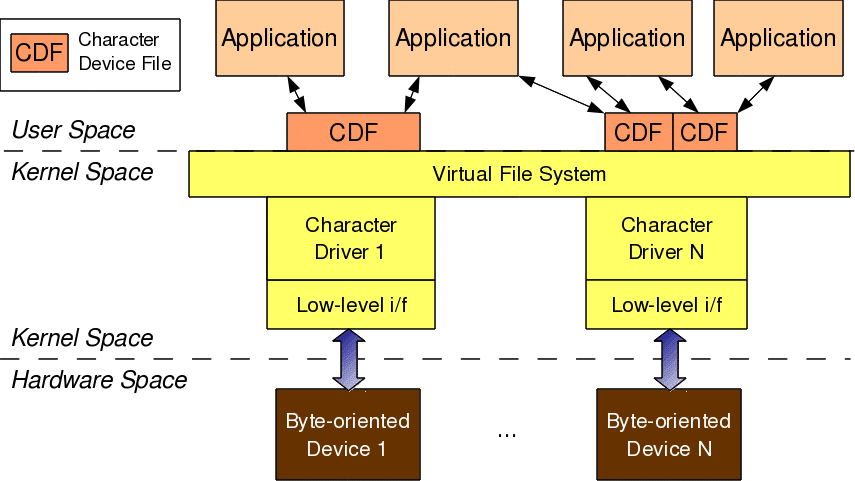
As shown in Figure 1, for any user-space application to operate on a byte-oriented device (in hardware space), it should use the corresponding character device driver (in kernel space). Character driver usage is done through the corresponding character device file(s), linked to it through the virtual file system (VFS). What this means is that an application does the usual file operations on the character device file. Those operations are translated to the corresponding functions in the linked character device driver by the VFS. Those functions then do the final low-level access to the actual device to achieve the desired results.

Note that though the application does the usual file operations, their outcome may not be the usual ones. Rather, they would be as driven by the corresponding functions in the device driver. For example, a write followed by a read may not fetch what has just been written to the character device file, unlike for regular files. Remember that this is the usual expected behaviour for device files. Let’s take an audio device file as an example. What we write into it is the audio data we want to play back, say through a speaker. However, the read would get us audio data that we are recording, say through a microphone. The recorded data need not be the played-back data.

In this complete connection from the application to the device, there are four major entities involved:

  1. Application
  2. Character device file
  3. Character device driver
  4. Character device

The interesting thing is that all of these can exist independently on a system, without the other being present. The mere existence of these on a system doesn’t mean they are linked to form the complete connection. Rather, they need to be explicitly connected. An application gets connected to a device file by invoking the open system call on the device file.

Device file(s) are linked to the device driver by specific registrations done by the driver. The driver is linked to a device by its device-specific low-level operations. Thus we form the complete connection. With this, note that the character device file is not the actual device, but just a place-holder for the actual device.

Major and minor numbers

The connection between the application and the device file is based on the name of the device file. However, the connection between the device file and the device driver is based on the number of the device file, not the name. This allows a user-space application to have any name for the device file, and enables the kernel-space to have a trivial index-based linkage between the device file and the device driver. This device file number is more commonly referred to as the <major, minor> pair, or the major and minor numbers of the device file.

Earlier (till kernel 2.4), one major number was for one driver, and the minor number used to represent the sub-functionalities of the driver. With kernel 2.6, this distinction is no longer mandatory; there could be multiple drivers under the same major number, but obviously, with different minor number ranges.

However, this is more common with the non-reserved major numbers, and standard major numbers are typically preserved for single drivers. For example, 4 for serial interfaces, 13 for mice, 14 for audio devices, and so on. The following command would list the various character device files on your system:

Posted in Uncategorized | Leave a comment

Multiple Data Compression

Posted in Uncategorized | Leave a comment

file i/o(open a file which contains passwords and login by matching the password entered by user.)

#include<stdio.h>
#include<string.h>
#include<stdlib.h>
int main()
{
char *pwd=NULL;
int ch=0,i=0,ret;
char *buff;
pwd=malloc(sizeof(char) *10);
buff=malloc(sizeof(char) *10);
FILE *fptr = NULL;
fptr=fopen(“hello.txt”,”r+”);
if(fptr == NULL)
{
perror(“fopen”);
return -1;
}
else
printf(“file is opened successfully\n”);
printf(“enter the password\n”);
gets(pwd);
ch=getc(fptr);
while(ch!=EOF)
{
if(ch!=’\n’)
{
buff[i]=ch;
ch=getc(fptr);
i++;
}
else
{
ret=strcmp(buff,pwd);
if(ret==0)
{
printf(“login successfully..\n”);
exit(0);
}
else
{
i=0;
ch=fgetc(fptr);
}
}
}
if(ch==EOF)
{
printf(“wrong password..try again\n”);
}
return 0;
}

Posted in Uncategorized | Leave a comment

Character driver driver

head 1.32;
access;
symbols;
locks; strict;
comment @ * @;

1.32
date 2014.05.06.06.20.21; author root; state Exp;
branches;
next 1.31;

1.31
date 2014.05.04.09.46.22; author root; state Exp;
branches;
next 1.30;

1.30
date 2014.05.04.08.15.17; author root; state Exp;
branches;
next 1.29;

1.29
date 2014.05.04.06.32.30; author root; state Exp;
branches;
next 1.28;

1.28
date 2014.05.04.06.13.17; author root; state Exp;
branches;
next 1.27;

1.27
date 2014.05.03.12.26.38; author root; state Exp;
branches;
next 1.26;

1.26
date 2014.05.03.12.19.24; author root; state Exp;
branches;
next 1.25;

1.25
date 2014.05.03.12.01.18; author root; state Exp;
branches;
next 1.24;

1.24
date 2014.05.03.11.38.57; author root; state Exp;
branches;
next 1.23;

1.23
date 2014.05.03.10.54.49; author root; state Exp;
branches;
next 1.22;

1.22
date 2014.05.03.10.52.50; author root; state Exp;
branches;
next 1.21;

1.21
date 2014.05.03.10.51.13; author root; state Exp;
branches;
next 1.20;

1.20
date 2014.05.03.10.50.08; author root; state Exp;
branches;
next 1.19;

1.19
date 2014.05.03.10.48.38; author root; state Exp;
branches;
next 1.18;

1.18
date 2014.05.03.10.47.31; author root; state Exp;
branches;
next 1.17;

1.17
date 2014.05.03.10.37.39; author root; state Exp;
branches;
next 1.16;

1.16
date 2014.05.03.10.32.07; author root; state Exp;
branches;
next 1.15;

1.15
date 2014.05.03.10.31.14; author root; state Exp;
branches;
next 1.14;

1.14
date 2014.05.03.10.30.05; author root; state Exp;
branches;
next 1.13;

1.13
date 2014.05.03.10.28.50; author root; state Exp;
branches;
next 1.12;

1.12
date 2014.05.03.10.28.12; author root; state Exp;
branches;
next 1.11;

1.11
date 2014.05.03.10.25.22; author root; state Exp;
branches;
next 1.10;

1.10
date 2014.04.29.11.10.44; author root; state Exp;
branches;
next 1.9;

1.9
date 2014.04.29.10.38.02; author root; state Exp;
branches;
next 1.8;

1.8
date 2014.04.28.11.57.51; author root; state Exp;
branches;
next 1.7;

1.7
date 2014.04.28.11.35.48; author root; state Exp;
branches;
next 1.6;

1.6
date 2014.04.28.11.08.34; author root; state Exp;
branches;
next 1.5;

1.5
date 2014.04.28.11.07.28; author root; state Exp;
branches;
next 1.4;

1.4
date 2014.04.28.11.05.58; author root; state Exp;
branches;
next 1.3;

1.3
date 2014.04.28.10.51.47; author root; state Exp;
branches;
next 1.2;

1.2
date 2014.04.28.10.43.08; author root; state Exp;
branches;
next 1.1;

1.1
date 2014.04.28.08.08.28; author user3; state Exp;
branches;
next ;

desc
@driver insert function
@

1.32
log
@use module_param .
@
text
@#include”header.h”
int node;
dev_t dev;
int ret;
int major,minor;
struct sculldev *sculldev;
module_param(node,int,S_IRUGO);
static int __init device_driver_init(void)
{
printk(KERN_INFO “Emblogic Pvt. Ltd.\n”);
ret=alloc_chrdev_region(&dev, 0,node,”kamal”);
major=MAJOR(dev);
minor=MINOR(dev);
printk(KERN_INFO “%d”,major);
printk(KERN_INFO “%d”,minor);
sculldev=kmalloc(sizeof(struct sculldev),GFP_KERNEL);
return 0;

}
module_init(device_driver_init);
@

1.31
log
@*** empty log message ***
@
text
@d7 1
a16 1
//void cdev_init(struct cdev *, const struct file_operations *);
@

1.30
log
@register the driver with alloc_chrdev_region.
@
text
@d10 1
a10 1
ret=alloc_chrdev_region(&dev, 0,1,”satinder”);
@

1.29
log
@*** empty log message ***
@
text
@d2 1
a2 1
int node=5;
d7 1
a7 1
static int device_driver_init(void)
@

1.28
log
@*** empty log message ***
@
text
@a1 1
#include”decleration.h”
d6 1
d17 1
@

1.27
log
@*** empty log message ***
@
text
@d2 1
@

1.26
log
@*** empty log message ***
@
text
@d14 1
a14 1
ret=kmalloc(sizeof(struct sculldev));
@

1.25
log
@use kmalloc
@
text
@d9 5
a13 5
ret=alloc_chrdev_region(&dev, 0,1,”satinder”);
major=MAJOR(dev);
minor=MINOR(dev);
printk(KERN_INFO “%d”,major);
printk(KERN_INFO “%d”,minor);
@

1.24
log
@*** empty log message ***
@
text
@d14 1
a14 1
//ret=kmalloc(sizeof(struct sculldev));
@

1.23
log
@*** empty log message ***
@
text
@d14 2
@

1.22
log
@*** empty log message ***
@
text
@d5 1
a5 1
int major,minior;
@

1.21
log
@*** empty log message ***
@
text
@d11 1
a11 1
minior=MAJOR(dev);
d13 1
a13 1
printk(KERN_INFO “%d”,minior);
@

1.20
log
@*** empty log message ***
@
text
@d11 1
a11 1
minior=MINIOR(dev);
@

1.19
log
@*** empty log message ***
@
text
@d11 1
a11 1
minior=MAJOR(dev);
@

1.18
log
@print the major and mimior numbers.
@
text
@d12 2
a13 2
printk(KERN INFO “%d”,major);
printk(KERN INFO “%d”,minior);
@

1.17
log
@*** empty log message ***
@
text
@d5 1
d10 5
@

1.16
log
@*** empty log message ***
@
text
@d9 1
a9 1

@

1.15
log
@*** empty log message ***
@
text
@d5 1
a5 1
static int device_driver_init(void)
@

1.14
log
@*** empty log message ***
@
text
@d10 1
a10 1
module_init(device_driver);
@

1.13
log
@*** empty log message ***
@
text
@d5 1
a5 1
static int __init device_driver(void)
@

1.12
log
@*** empty log message ***
@
text
@d10 1
a10 1
module_init(device_driver_init);
@

1.11
log
@__init add in function init.
@
text
@d5 1
a5 1
static int __init device_driver_init(void)
@

1.10
log
@register the driver.
@
text
@d5 1
a5 1
static int device_driver_init(void)
d7 3
a9 8
printk(KERN_INFO “Emblogic Pvt. Ltd.\n”);
ret=alloc_chrdev_region(&dev, 0,1,”satinder”);
//if(ret)
//{
//printk(KERN_INFO “RET=%d”,ret);
//}
return 0;
}
@

1.9
log
@*** empty log message ***
@
text
@d3 2
d8 1
a8 1
//ret=alloc_chrdev_region(&dev, unsigned, unsigned, “satinder”);
@

1.8
log
@define the int dev.
@
text
@a2 1
int dev;
d6 5
a10 5
ret=alloc_chrdev_region(&dev, unsigned, unsigned, “satinder”);
if(ret)
{
printk(KERN_INFO “RET=%d”,ret);
}
@

1.7
log
@register the driver.
@
text
@d3 1
@

1.6
log
@*** empty log message ***
@
text
@d6 5
@

1.5
log
@defined int node.
@
text
@d2 1
a4 1
int node=5;
@

1.4
log
@remove the decleration.h file
@
text
@d4 1
a4 1
node=5;
@

1.3
log
@give the value to the node.
@
text
@a1 1
#include”decleration.h”
@

1.2
log
@*** empty log message ***
@
text
@d2 1
d5 2
a6 1
printk(KERN_INFO “Emblogic Pvt. Ltd.\n”);
@

1.1
log
@Initial revision
@
text
@d4 1
a4 1
printk(KERN_INFO “HELLO KERNAL I AM NEW DRIVER”);
@

Posted in Character Driver | Leave a comment

program for simple queue

@this a program for simple queue to push pop and display the elements of the queue
@

1.1
log
@Initial revision
@
text
@#include”header.h”
int main()
{
void *queue;
int f,r;
f=r=-1;
int ch;
do
{
printf(“1:push\n”);
printf(“2:pop\n”);
printf(“3:display\n”);
printf(“4:exit\n”);
printf(“enter your choice\n”);
scanf(“%d”,&ch);
switch(ch)
{
case 1: push(&queue,&f,&r);
break;
case 2: pop(&queue,&f,&r);
break;
case 3: display(&queue,&f,&r);
break;
default: printf(“wrong choice\n”);
}
}while(ch != 4);
return 0;
}

#include”header.h”
static char ch=1;
int push(void **qa,int *fa,int *ra)
{
if(*ra >= MAX-1)
{
printf(“queue overflow\n”);
return -1;
}
if(*fa ==-1 && *ra == -1)
{
*qa=(char *)malloc(1);
(*fa)++;
(*ra)++;
*(char *)(*qa + *ra)=ch;
ch++;
return 0;
}
*qa=(char *)realloc(*qa, (*ra)+2);
(*ra)++;
*(char *)(*qa + *ra)=ch;
ch++;
return 0;
}

int pop(void **qa,int *fa,int *ra)
{
if(*fa >= MAX)
{
printf(“queue underflow\n”);
return -1;
}
printf(“the %d popped element is %d\n”,*fa, *(char *)(*qa + *fa));
(*fa)++;
return 0;
}
void display(void **qa,int *fa,int *ra)
{
int i;
for(i= *fa; i <= *ra ; i++)
{
printf(“the %d element is %d\n”,i,*(char *)(*qa + i));
}
}

@

Posted in Uncategorized | Leave a comment

DIFFERENCE BETWEEN NUL AND NULL

NULL
1 IT is macrodefined in for the null pointer .
2 NULL CAN BE DEFINED AS ((void*)0)
3 size of NULL= 4BYTES

NUL
1 IT IS A USER DEFINED VARIABLE.
2 IST CHAR IN THE ASCII TABLE.
3 IT CORRESPONDS TO A ZERO VALUE.
4 SIZE OF NUL = 1 BYTE

Posted in Uncategorized | Leave a comment

Big and Little Endian

Big and Little Endian

Basic Memory Concepts

In order to understand the concept of big and little endian, you need to understand memory. Fortunately, we only need a very high level abstraction for memory. You don’t need to know all the little details of how memory works.

All you need to know about memory is that it’s one large array. But one large array containing what? The array contains bytes. In computer organization, people don’t use the term “index” to refer to the array locations. Instead, we use the term “address”. “address” and “index” mean the same, so if you’re getting confused, just think of “address” as “index”.

Each address stores one element of the memory “array”. Each element is typically one byte. There are some memory configurations where each address stores something besides a byte. For example, you might store a nybble or a bit. However, those are exceedingly rare, so for now, we make the broad assumption that all memory addresses store bytes.

I will sometimes say that memory is byte-addresseable. This is just a fancy way of saying that each address stores one byte. If I say memory is nybble-addressable, that means each memory address stores one nybble.

Storing Words in Memory

We’ve defined a word to mean 32 bits. This is the same as 4 bytes. Integers, single-precision floating point numbers, and MIPS instructions are all 32 bits long. How can we store these values into memory? After all, each memory address can store a single byte, not 4 bytes.

The answer is simple. We split the 32 bit quantity into 4 bytes. For example, suppose we have a 32 bit quantity, written as 90AB12CD16, which is hexadecimal. Since each hex digit is 4 bits, we need 8 hex digits to represent the 32 bit value.

So, the 4 bytes are: 90, AB, 12, CD where each byte requires 2 hex digits.

It turns out there are two ways to store this in memory.

Big Endian

In big endian, you store the most significant byte in the smallest address. Here’s how it would look:


Address Value
1000 90
1001 AB
1002 12
1003 CD

Little Endian

In little endian, you store the leastsignificant byte in the smallest address. Here’s how it would look:


Address Value
1000 CD
1001 12
1002 AB
1003 90

Notice that this is in the reverse order compared to big endian. To remember which is which, recall whether the least significant byte is stored first (thus, little endian) or the most significant byte is stored first (thus, big endian).

Notice I used “byte” instead of “bit” in least significant bit. I sometimes abbreciated this as LSB and MSB, with the ‘B’ capitalized to refer to byte and use the lowercase ‘b’ to represent bit. I only refer to most and least significant byte when it comes to endianness.

Which Way Makes Sense?

Different ISAs use different endianness. While one way may seem more natural to you (most people think big-endian is more natural), there is justification for either one.

For example, DEC and IBMs(?) are little endian, while Motorolas and Suns are big endian. MIPS processors allowed you to select a configuration where it would be big or little endian.

Why is endianness so important? Suppose you are storing int values to a file, then you send the file to a machine which uses the opposite endianness and read in the value. You’ll run into problems because of endianness. You’ll read in reversed values that won’t make sense.

Endianness is also a big issue when sending numbers over the network. Again, if you send a value from a machine of one endianness to a machine of the opposite endianness, you’ll have problems. This is even worse over the network, because you might not be able to determine the endianness of the machine that sent you the data.

The solution is to send 4 byte quantities using network byte order which is arbitrarily picked to be one of the endianness (not sure if it’s big or little, but it’s one of them). If your machine has the same endianness as network byte order, then great, no change is needed. If not, then you must reverse the bytes.

History of Endian-ness

Where does this term “endian” come from? Jonathan Swift was a satirist (he poked fun at society through his writings). His most famous book is “Gulliver’s Travels”, and he talks about how certain people prefer to eat their hard boiled eggs from the little end first (thus, little endian), while others prefer to eat from the big end (thus, big endians) and how this lead to various wars.

Of course, the point was to say that it was a silly thing to debate over, and yet, people argue over such trivialities all the time (for example, should braces line in parallel or not? vi or emacs? UNIX or Windows).

Misconceptions

Endianness only makes sense when you want to break a large value (such as a word) into several small ones. You must decide on an order to place it in memory.

However, if you have a 32 bit register storing a 32 bit value, it makes no sense to talk about endianness. The register is neither big endian nor little endian. It’s just a register holding a 32 bit value. The rightmost bit is the least significant bit, and the leftmost bit is the most significant bit.

There’s no reason to rearrange the bytes in a register in some other way.

Endianness only makes sense when you are breaking up a multi-byte quantity, and attempting to store the bytes at consecutive memory locations. In a register, it doesn’t make sense. A register is simply a 32 bit quantity, b31….b0, and endianness does not apply to it.

With regard to endianness, You may argue there’s a very natural way to store 4 bytes in 4 consecutive addresses, and that the other way looks strange. In particular, it looks “backwards”. However, what’s natural to you may not be natural to someone else. The fact of the matter is that the word is split in 4 bytes, and most people would agree that you need some order to place it in memory.

C-style strings

Once you start thinking about endianness, you begin to think it applies to everything. Before you see big or little endian, you may have had no idea it even existed. That’s because it’s reasonably well-hidden from you.

If you do bitwise/bitshift operations on an int, you don’t notice the endianness. The machine arranges the multiple bytes so the least significant byte is still the least significant byte (e.g., b7-0) and the most significant byte is still the most significant byte (e.g., b31-24).

So, it’s natural to think whether strings might be saved in some sort of strange order, depending on the machine.

This is where it’s useful to think about all the facts you know about arrays. A C-style string, after all, is still an array of characters.

Here are some facts you should know about C-style strings and arrays.


  • C-style strings are stored in arrays of characters.
  • Each character requires one byte of memory, since characters are represented in ASCII (in the future, this could change, as Unicode becomes more popular).
  • In an array, the address of consecutive array elements increases. Thus, & arr[ i ] is less than & arr[ i + 1 ].
  • What’s not as obvious is that if something is stored in increasing addresses in memory, it’s going to be stored in increasing “addresses” in a file. When you write to a file, you usually specify an address in memory, and the number of bytes you wish to write to the file starting at that address.

So, let’s imagine some C-style string in memory. You have the word “cat”. Let’s pretend ‘c’ is stored at address 1000. Then ‘a’ is stored at 1001. ‘t’ is at 1002. The null character ” is at 1003.

Since C-style strings are arrays of characters, they follow the rules of characters. Unlike int or long, you can easily see the individual bytes of a C-style string, one byte at a time. You use array indexing to access the bytes (i.e., characters) of a string. You can’t easily index the bytes of an int or long, without playing some pointer tricks (using reinterpret cast, for example, in C++). The individual bytes of an int are more or less hidden from you.

Now imagine writing out this string to a file using some sort of write() method. You specify a pointer to ‘c’, and the number of bytes you wish to print (in this case 4). The write() method proceeds byte by byte in the character string and writes it to the file, starting with ‘c’ and working to the null character.

Given that explanation, is it clear whether endianness matters with C-style strings? Hopefully, it is clear.

As an aside, since C++ strings are objects, it may have complicated inner structures, and so it’s less obvious what a C++ string would look like when print out to a file. It’s well-known what a C-style string looks like (a sequence of characters ending in a null character), which is why I’ve been careful to call them C-style strings.


Posted in Uncategorized | Leave a comment

GRUB

GNU GRUB is a bootloader capable of loading a variety of free and proprietary operating systems. GRUB will work well with Linux, DOS, Windows, or BSD. GRUB stands for GRand Unified Bootloader.

GRUB is dynamically configurable. This means that the user can make changes during the boot time, which include altering existing boot entries, adding new, custom entries, selecting different kernels, or modifying initrd. GRUB also supports Logical Block Address mode. This means that if your computer has a fairly modern BIOS that can access more than 8GB (first 1024 cylinders) of hard disk space, GRUB will automatically be able to access all of it.

GRUB can be run from or be installed to any device (floppy disk, hard disk, CD-ROM, USB drive, network drive) and can load operating systems from just as many locations, including network drives. It can also decompress operating system images before booting them.

Posted in Project 9: Embedded Linux on ARM | Leave a comment

cortex A-8

Cortex-A8 Processor
The ARM Cortex™-A8 processor, based on the ARMv7 architecture, has the ability to scale in speed from 600MHz to greater than 1GHz. The Cortex-A8 processor can meet the requirements for power-optimized mobile devices needing operation in less than 300mW; and performance-optimized consumer applications requiring 2000 Dhrystone.

CORTEX A-8

The Cortex-A8 high-performance processor is proven in end devices today. From high-end feature phones to netbooks, DTVs, printers and automotive-infotainment, the Cortex-A8 processor offers a proven high-performance solution with millions of units shipped annually.

The processor is particularly suited to high-performance applications.

Frequency from 600MHz to 1GHz and above
High-performance, Superscalar microarchitecture
NEON™technology for multi-media and SIMD processing
Binary compatibility with ARM926, ARM1136, and ARM1176 Processors

Posted in Uncategorized | Leave a comment

volatile modifier in c

All variable in c are by default not volatile. With help of modifier volatile which is keyword of c language you can make any variable as volatile variable.

Properties of volatile variable:
1. A volatile variable can be changed by the background routine of preprocessor. This background routine may be interrupt signals by microprocessor, threads, real times clocks etc.
2. In simple word we can say a value volatile variable which has stored in the memory can be by any external sources.
3. Whenever compiler encounter any reference of volatile variable is always load the value of variable from memory so that if any external source has modified the value in the memory complier will get its updated value.
4. Working principle of volatile variable is opposite to the register variable in c. Hence volatile variables take more execution time than non-volatile variables.
A volatile variable is declared with help of keyword volatile:
int volatile i;
A non-volatile variable is declared without using keyword volatile:

int i;

Posted in Data Structures with C | Leave a comment

Shell Script basics

RCS file: script,v
Working file: script
head: 1.34
branch:
locks: strict
akshat: 1.34
access list:
symbolic names:
keyword substitution: kv
total revisions: 34;    selected revisions: 34
description:
Introduction to shell script.
Shells are wrappers around os, shells can act as interface b/w user and kernel.
shells takes the commands entered by user and calls the os to run those commands.
the $ is shell prompt.
Bash is default shell, Every shell has some process id.
we can change the shell by using chsh(change shell command)
—————————-
revision 1.34    locked by: akshat;
date: 2014/04/06 05:25:04;  author: akshat;  state: Exp;  lines: +1 -1
proper spaces are to be given for comparison, eq can also be used for the same.
—————————-
revision 1.33
date: 2014/04/06 05:23:20;  author: akshat;  state: Exp;  lines: +1 -1
conditions are checked.
—————————-
revision 1.32
date: 2014/04/06 05:22:49;  author: akshat;  state: Exp;  lines: +1 -1
:D
—————————-
revision 1.31
date: 2014/04/06 05:21:52;  author: akshat;  state: Exp;  lines: +2 -0
working on elif.
—————————-
revision 1.30
date: 2014/04/06 05:18:57;  author: akshat;  state: Exp;  lines: +3 -1
if else working.
now will work for else if.
—————————-
revision 1.29
date: 2014/04/06 05:17:10;  author: akshat;  state: Exp;  lines: +1 -1
read $3 and then echo $3, confusion :O
—————————-
revision 1.28
date: 2014/04/06 05:07:01;  author: akshat;  state: Exp;  lines: +2 -2
working.
—————————-
revision 1.27
date: 2014/04/06 05:04:41;  author: akshat;  state: Exp;  lines: +1 -1
*** empty log message ***
—————————-
revision 1.26
date: 2014/04/06 04:59:57;  author: akshat;  state: Exp;  lines: +1 -1
conditional statements are working.
goin ahead for else nd ifelse
—————————-
revision 1.25
date: 2014/04/06 04:56:43;  author: akshat;  state: Exp;  lines: +2 -1
if statement uses then nd fi instead of braces.
—————————-
revision 1.24
date: 2014/04/06 04:52:32;  author: akshat;  state: Exp;  lines: +4 -1
using conditional statements in scripts now.
—————————-
revision 1.23
date: 2014/04/06 04:44:24;  author: akshat;  state: Exp;  lines: +2 -4
read is now used in reading directly from command line.
read $3
10 echo  $3
—————————-
revision 1.22
date: 2014/04/06 04:43:05;  author: akshat;  state: Exp;  lines: +1 -0
*** empty log message ***
—————————-
revision 1.21
date: 2014/04/06 04:41:23;  author: akshat;  state: Exp;  lines: +2 -1
echo #$ will give a blank line.
—————————-
revision 1.20
date: 2014/04/06 04:38:36;  author: akshat;  state: Exp;  lines: +1 -0
echo $# will give the list of command line arguments
—————————-
revision 1.19
date: 2014/04/06 04:37:41;  author: akshat;  state: Exp;  lines: +2 -1
echo $$ is used to give pid of script.
—————————-
revision 1.18
date: 2014/04/06 04:35:14;  author: akshat;  state: Exp;  lines: +1 -1
echo -n is used for appending the interpretation in same line.
—————————-
revision 1.17
date: 2014/04/06 04:31:35;  author: akshat;  state: Exp;  lines: +2 -2
echo $* will print all the command line arguments.
—————————-
revision 1.16
date: 2014/04/06 04:30:01;  author: akshat;  state: Exp;  lines: +2 -2
passing second command line argument now.
—————————-
revision 1.15
date: 2014/04/06 04:28:07;  author: akshat;  state: Exp;  lines: +1 -0
command line arguments, How to present these command line arguments in a script.
—————————-
revision 1.14
date: 2014/04/06 04:27:07;  author: akshat;  state: Exp;  lines: +2 -1
line by line taking read.
—————————-
revision 1.13
date: 2014/04/06 04:04:45;  author: akshat;  state: Exp;  lines: +2 -0
read is used for stdin in scripting.
—————————-
revision 1.12
date: 2014/04/06 04:03:09;  author: akshat;  state: Exp;  lines: +1 -1
single inverted commas are interpreted differently.
—————————-
revision 1.11
date: 2014/04/06 04:02:05;  author: akshat;  state: Exp;  lines: +1 -1
:):):):)
—————————-
revision 1.10
date: 2014/04/06 04:00:31;  author: akshat;  state: Exp;  lines: +1 -0
working on more commands :D.
—————————-
revision 1.9
date: 2014/04/06 03:58:37;  author: akshat;  state: Exp;  lines: +2 -1
echo “akshat”$PATH will give various paths, Basically it is predefined macro.
—————————-
revision 1.8
date: 2014/04/06 03:55:29;  author: akshat;  state: Exp;  lines: +1 -1
Script can also be referred to as collection of commands.
Program is collection of statements.
—————————-
revision 1.7
date: 2014/04/06 03:53:27;  author: akshat;  state: Exp;  lines: +2 -2
echo “akshat” $HOME will give the path of home.
—————————-
revision 1.6
date: 2014/04/06 03:52:49;  author: akshat;  state: Exp;  lines: +2 -1
*** empty log message ***
—————————-
revision 1.5
date: 2014/04/06 03:51:12;  author: akshat;  state: Exp;  lines: +1 -1
working on more commands in same script.
—————————-
revision 1.4
date: 2014/04/06 03:46:59;  author: akshat;  state: Exp;  lines: +1 -1
value can be assigned to any variable var1=1 without using space btw variable and =.
—————————-
revision 1.3
date: 2014/04/06 03:45:41;  author: akshat;  state: Exp;  lines: +2 -0
working on more commands in script.
—————————-
revision 1.2
date: 2014/04/06 03:33:25;  author: akshat;  state: Exp;  lines: +3 -0
Echo command is used for printing a string.
—————————-
revision 1.1
date: 2014/04/06 03:30:30;  author: akshat;  state: Exp;
Initial revision
=============================================================================

Posted in Shell Scripts | Leave a comment