EmbLogic's Blog

client server communication using threads and socket

Eurekkkkkkaaaaaaaa……………..

Successfully implemented client server communication using threads and socket.

Problems which you might face

1>unsuccessfull bind()

2>unlinking not successfull in AF_INET,,,unlink() won’t work in  this case.

2.1>server_addr.sin_addr.s_addr=IPaddress like 192.168.1.0 not taking showing warning.

3>when to create processing_client and server socket……

in thread or main().


Posted in Project 04: FTP based Client Server using Threads and Sockets, Uncategorized | Tagged | Leave a comment

Endianness

Big Endian

In big endian, you store the most significant byte in the smallest address. Here’s how it would look:


Address Value
1000 90
1001 AB
1002 12
1003 CD

Little Endian

In little endian, you store the least significant byte in the smallest address. Here’s how it would look:


Address Value
1000 CD
1001 12
1002 AB
1003 90

Notice that this is in the reverse order compared to big endian. To remember which is which, recall whether the least significant byte is stored first (thus, little endian) or the most significant byte is stored first (thus, big endian).

Notice I used “byte” instead of “bit” in least significant bit. I sometimes abbreciated this as LSB and MSB, with the ‘B’ capitalized to refer to byte and use the lowercase ‘b’ to represent bit. I only refer to most and least significant byte when it comes to endianness.

Different ISAs use different endianness. While one way may seem more natural to you (most people think big-endian is more natural), there is justification for either one.

For example, DEC and IBMs(?) are little endian, while Motorolas and Suns are big endian. MIPS processors allowed you to select a configuration where it would be big or little endian.

Why is endianness so important? Suppose you are storing int values to a file, then you send the file to a machine which uses the opposite endianness and read in the value. You’ll run into problems because of endianness. You’ll read in reversed values that won’t make sense.

Endianness is also a big issue when sending numbers over the network. Again, if you send a value from a machine of one endianness to a machine of the opposite endianness, you’ll have problems. This is even worse over the network, because you might not be able to determine the endianness of the machine that sent you the data.

The solution is to send 4 byte quantities using network byte order which is arbitrarily picked to be one of the endianness (not sure if it’s big or little, but it’s one of them). If your machine has the same endianness as network byte order, then great, no change is needed. If not, then you must reverse the bytes.

Posted in Uncategorized | Leave a comment

Structure Member Alignment and structure Padding

What do we mean by data alignment, structure packing and padding?

Predict the output of following program.

#include <stdio.h>
// Alignment requirements
// (typical 32 bit machine)
// char         1 byte
// short int    2 bytes
// int          4 bytes
// double       8 bytes
// structure A
typedef struct structa_tag
{
   char        c;
   short int   s;
} structa_t;
// structure B
typedef struct structb_tag
{
   short int   s;
   char        c;
   int         i;
} structb_t;
// structure C
typedef struct structc_tag
{
   char        c;
   double      d;
   int         s;
} structc_t;
// structure D
typedef struct structd_tag
{
   double      d;
   int         s;
   char        c;
} structd_t;
int main()
{
   printf("sizeof(structa_t) = %d\n", sizeof(structa_t));
   printf("sizeof(structb_t) = %d\n", sizeof(structb_t));
   printf("sizeof(structc_t) = %d\n", sizeof(structc_t));
   printf("sizeof(structd_t) = %d\n", sizeof(structd_t));
   return 0;
}

Before moving further, write down your answer on a paper, and read on. If you urge to see explanation, you may miss to understand any lacuna in your analogy. Also read the post by Kartik.

Data Alignment:

Every data type in C/C++ will have alignment requirement (infact it is mandated by processor architecture, not by language). A processor will have processing word length as that of data bus size. On a 32 bit machine, the processing word size will be 4 bytes.

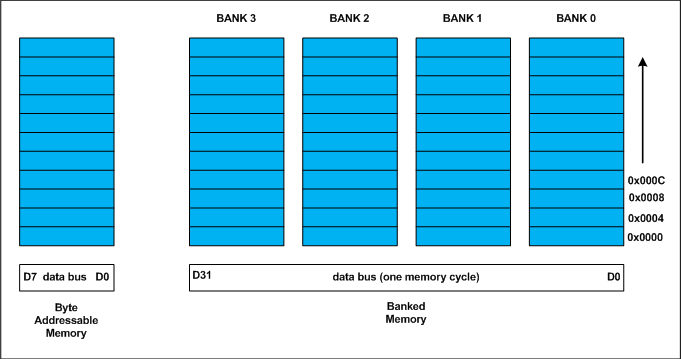
Historically memory is byte addressable and arranged sequentially. If the memory is arranged as single bank of one byte width, the processor needs to issue 4 memory read cycles to fetch an integer. It is more economical to read all 4 bytes of integer in one memory cycle. To take such advantage, the memory will be arranged as group of 4 banks as shown in the above figure.

The memory addressing still be sequential. If bank 0 occupies an address X, bank 1, bank 2 and bank 3 will be at (X + 1), (X + 2) and (X + 3) addresses. If an integer of 4 bytes is allocated on X address (X is multiple of 4), the processor needs only one memory cycle to read entire integer.

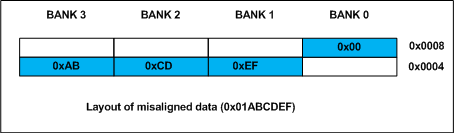
Where as, if the integer is allocated at an address other than multiple of 4, it spans across two rows of the banks as shown in the below figure. Such an integer requires two memory read cycle to fetch the data.

A variable’s data alignment deals with the way the data stored in these banks. For example, the natural alignment of int on 32-bit machine is 4 bytes. When a data type is naturally aligned, the CPU fetches it in minimum read cycles.

Similarly, the natural alignment of short int is 2 bytes. It means, a short int can be stored in bank 0 – bank 1 pair or bank 2 – bank 3 pair. A double requires 8 bytes, and occupies two rows in the memory banks. Any misalignment of double will force more than two read cycles to fetch double data.

Note that a double variable will be allocated on 8 byte boundary on 32 bit machine and requires two memory read cycles. On a 64 bit machine, based on number of banks, double variable will be allocated on 8 byte boundary and requires only one memory read cycle.

Structure Padding:

In C/C++ a structures are used as data pack. It doesn’t provide any data encapsulation or data hiding features (C++ case is an exception due to its semantic similarity with classes).

Because of the alignment requirements of various data types, every member of structure should be naturally aligned. The members of structure allocated sequentially increasing order. Let us analyze each struct declared in the above program.

Output of Above Program:

For the sake of convenience, assume every structure type variable is allocated on 4 byte boundary (say 0×0000), i.e. the base address of structure is multiple of 4 (need not necessary always, see explanation of structc_t).

structure A

The structa_t first element is char which is one byte aligned, followed by short int. short int is 2 byte aligned. If the the short int element is immediately allocated after the char element, it will start at an odd address boundary. The compiler will insert a padding byte after the char to ensure short int will have an address multiple of 2 (i.e. 2 byte aligned). The total size of structa_t will be sizeof(char) + 1 (padding) + sizeof(short), 1 + 1 + 2 = 4 bytes.

structure B

The first member of structb_t is short int followed by char. Since char can be on any byte boundary no padding required in between short int and char, on total they occupy 3 bytes. The next member is int. If the int is allocated immediately, it will start at an odd byte boundary. We need 1 byte padding after the char member to make the address of next int member is 4 byte aligned. On total, the structb_t requires 2 + 1 + 1 (padding) + 4 = 8 bytes.

structure C – Every structure will also have alignment requirements

Applying same analysis, structc_t needs sizeof(char) + 7 byte padding + sizeof(double) + sizeof(int) = 1 + 7 + 8 + 4 = 20 bytes. However, the sizeof(structc_t) will be 24 bytes. It is because, along with structure members, structure type variables will also have natural alignment. Let us understand it by an example. Say, we declared an array of structc_t as shown below

structc_t structc_array[3];

Assume, the base address of structc_array is 0×0000 for easy calculations. If the structc_t occupies 20 (0×14) bytes as we calculated, the second structc_t array element (indexed at 1) will be at 0×0000 + 0×0014 = 0×0014. It is the start address of index 1 element of array. The double member of this structc_t will be allocated on 0×0014 + 0×1 + 0×7 = 0x001C (decimal 28) which is not multiple of 8 and conflicting with the alignment requirements of double. As we mentioned on the top, the alignment requirement of double is 8 bytes.

Inorder to avoid such misalignment, compiler will introduce alignment requirement to every structure. It will be as that of the largest member of the structure. In our case alignment of structa_t is 2, structb_t is 4 and structc_t is 8. If we need nested structures, the size of largest inner structure will be the alignment of immediate larger structure.

In structc_t of the above program, there will be padding of 4 bytes after int member to make the structure size multiple of its alignment. Thus the sizeof (structc_t) is 24 bytes. It guarantees correct alignment even in arrays. You can cross check.

structure D - How to Reduce Padding?

By now, it may be clear that padding is unavoidable. There is a way to minimize padding. The programmer should declare the structure members in their increasing/decreasing order of size. An example is structd_t given in our code, whose size is 16 bytes in lieu of 24 bytes of structc_t.

Posted in Data Structures with C | Leave a comment

relatin b/w fork() &n execl..

Trying to use execl b/w server and processing clients without fork();

O/P–>block on read or write will definitely occur on server-pro_client side…….

When we use fork( ) to create a child process the child process
does not contain the entire data and code of the parent process.
Then

Does it mean that the child process contains the data and code below the fork( ) call???????

Even this is not so. In actuality the code
never gets duplicated. Linux internally manages to intelligently
share it. As against this, some data is shared, some is not. Till the
time both the processes do not change the value of the variables
they keep getting shared. However, if any of the processes (either
child or parent) attempt to change the value of a variable it is no
longer shared. Instead a new copy of the variable is made for the
process that is attempting to change it. This not only ensures data
integrity but also saves precious memory.


Posted in Project 03: Client Server Communication using Linux and IPC, Project 04: FTP based Client Server using Threads and Sockets | Tagged | Leave a comment

implemented ioctl :change quantum and qset using operation

RCS file: ./ioctl.c,v
Working file: ./ioctl.c
head: 1.23
branch:
locks: strict
root: 1.23
access list:
symbolic names:
keyword substitution: kv
total revisions: 23; selected revisions: 23
description:
this is our ioctl.c file for driver operations
—————————-
revision 1.23 locked by: root;
date: 2014/06/11 03:22:58; author: root; state: Exp; lines: +6 -1
IOCSQSET applied in case
—————————-
revision 1.22
date: 2014/06/08 20:06:07; author: root; state: Exp; lines: +1 -1
working fine for scull_IOCSQUANTUM
able to set the quantum value to 16 or 32 and then write changes in skull and then read the skull properly
working fine till now
—————————-
revision 1.21
date: 2014/06/08 05:31:57; author: root; state: Exp; lines: +3 -0
*** empty log message ***
—————————-
revision 1.20
date: 2014/06/07 22:09:52; author: root; state: Exp; lines: +3 -6
*** empty log message ***
—————————-
revision 1.19
date: 2014/06/07 19:36:41; author: root; state: Exp; lines: +2 -2
*** empty log message ***
—————————-
revision 1.18
date: 2014/06/07 19:20:32; author: root; state: Exp; lines: +2 -1
*** empty log message ***
—————————-
revision 1.17
date: 2014/06/07 19:19:11; author: root; state: Exp; lines: +1 -1
*** empty log message ***
—————————-
revision 1.16
date: 2014/06/07 19:16:56; author: root; state: Exp; lines: +1 -1
*** empty log message ***
—————————-
revision 1.15
date: 2014/06/07 19:16:35; author: root; state: Exp; lines: +3 -3
*** empty log message ***
—————————-
revision 1.14
date: 2014/06/07 19:10:41; author: root; state: Exp; lines: +1 -2
*** empty log message ***
—————————-
revision 1.13
date: 2014/06/07 19:08:04; author: root; state: Exp; lines: +1 -1
*** empty log message ***
—————————-
revision 1.12
date: 2014/06/07 19:07:40; author: root; state: Exp; lines: +5 -5
testing!!!!!!!!!!!!!!!!!
—————————-
revision 1.11
date: 2014/06/07 19:00:39; author: root; state: Exp; lines: +6 -5
testing
—————————-
revision 1.10
date: 2014/06/07 18:32:34; author: root; state: Exp; lines: +4 -4
working fine for IOCGQUANTUM…….!!!!!!!!!!!!!!!
—————————-
revision 1.9
date: 2014/06/07 18:04:09; author: root; state: Exp; lines: +2 -2
*** empty log message ***
—————————-
revision 1.8
date: 2014/06/07 17:51:09; author: root; state: Exp; lines: +3 -2
*** empty log message ***
—————————-
revision 1.7
date: 2014/06/07 17:48:12; author: root; state: Exp; lines: +1 -1
*** empty log message ***
—————————-
revision 1.6
date: 2014/06/07 17:44:38; author: root; state: Exp; lines: +3 -1
testing!!!!!!!!!!!!!!!!!
—————————-
revision 1.5
date: 2014/06/07 17:37:27; author: root; state: Exp; lines: +2 -1
*** empty log message ***
—————————-
revision 1.4
date: 2014/06/07 17:34:13; author: root; state: Exp; lines: +2 -2
*** empty log message ***
—————————-
revision 1.3
date: 2014/06/07 17:30:50; author: root; state: Exp; lines: +1 -1
updated ret for case IOCSQUANTUM
—————————-
revision 1.2
date: 2014/06/07 17:22:00; author: root; state: Exp; lines: +1 -1
include commands like SCULL_IOCSQUANTUM
—————————-
revision 1.1
date: 2014/06/07 17:11:17; author: root; state: Exp;
Initial revision
============================================================================

Posted in Character Driver | Leave a comment

Socket using client & server

Most interprocess communication uses the client server model. These terms refer to the two processes which will be communicating with each other. One of the two processes, the client, connects to the other process, the server, typically to make a request for information. A good analogy is a person who makes a phone call to another person.

Notice that the client needs to know of the existence of and the address of the server, but the server does not need to know the address of (or even the existence of) the client prior to the connection being established. Notice also that once a connection is established, both sides can send and receive information.

The system calls for establishing a connection are somewhat different for the client and the server, but both involve the basic construct of a socket. A socket is one end of an interprocess communication channel. The two processes each establish their own socket.

The steps involved in establishing a socket on the client side are as follows:

  1. Create a socket with the socket() system call
  2. Connect the socket to the address of the server using the connect() system call
  3. Send and receive data. There are a number of ways to do this, but the simplest is to use the read() and write() system calls.

The steps involved in establishing a socket on the server side are as follows:

  1. Create a socket with the socket() system call
  2. Bind the socket to an address using the bind() system call. For a server socket on the Internet, an address consists of a port number on the host machine.
  3. Listen for connections with the listen() system call
  4. Accept a connection with the accept() system call. This call typically blocks until a client connects with the server.
  5. Send and receive data

Socket Types

When a socket is created, the program has to specify the address domain and the socket type. Two processes can communicate with each other only if their sockets are of the same type and in the same domain. There are two widely used address domains, the unix domain, in which two processes which share a common file system communicate, and the Internet domain, in which two processes running on any two hosts on the Internet communicate. Each of these has its own address format.

The address of a socket in the Unix domain is a character string which is basically an entry in the file system.

The address of a socket in the Internet domain consists of the Internet address of the host machine (every computer on the Internet has a unique 32 bit address, often referred to as its IP address). In addition, each socket needs a port number on that host. Port numbers are 16 bit unsigned integers. The lower numbers are reserved in Unix for standard services. For example, the port number for the FTP server is 21. It is important that standard services be at the same port on all computers so that clients will know their addresses. However, port numbers above 2000 are generally available.

There are two widely used socket types, stream sockets, and datagram sockets. Stream sockets treat communications as a continuous stream of characters, while datagram sockets have to read entire messages at once. Each uses its own communciations protocol. Stream sockets use TCP (Transmission Control Protocol), which is a reliable, stream oriented protocol, and datagram sockets use UDP (Unix Datagram Protocol), which is unreliable and message oriented.

The examples in this tutorial will use sockets in the Internet domain using the TCP protocol.

Sample code

C code for a very simple client and server are provided for you. These communicate using stream sockets in the Internet domain. The code is described in detail below. However, before you read the descriptions and look at the code, you should compile and run the two programs to see what they do.

Click here for the server program

Click here for the client program

Download these into files called server.c and client.c and compile them separately into two executables called server and client. They require special compiling flags as stated in their respective progarms.

Ideally, you should run the client and the server on separate hosts on the Internet. Start the server first. Suppose the server is running on a machine called cheerios. When you run the server, you need to pass the port number in as an argument. You can choose any number between 2000 and 65535. If this port is already in use on that machine, the server will tell you this and exit. If this happens, just choose another port and try again. If the port is available, the server will block until it receives a connection from the client. Don’t be alarmed if the server doesn’t do anything; it’s not supposed to do anything until a connection is made. Here is a typical command line:

server 51717

To run the client you need to pass in two arguments, the name of the host on which the server is running and the port number on which the server is listening for connections. Here is the command line to connect to the server described above:

client cheerios 51717

The client will prompt you to enter a message. If everything works correctly, the server will display your message on stdout, send an acknowledgement message to the client and terminate. The client will print the acknowledgement message from the server and then terminate.

You can simulate this on a single machine by running the server in one window and the client in another. In this case, you can use the keyword localhost as the first argument to the client.

Server code

The server code uses a number of ugly programming constructs, and so we will go through it line by line.


#include <stdio.h>

This header file contains declarations used in most input and output and is typically included in all C programs.


#include <sys/types.h>

This header file contains definitions of a number of data types used in system calls. These types are used in the next two include files.


#include <sys/socket.h>

The header file socket.h includes a number of definitions of structures needed for sockets.


#include <netinet/in.h>

The header file netinet/in.h contains constants and structures needed for internet domain addresses.


void error(char *msg)
{
    perror(msg);
    exit(1);
}

This function is called when a system call fails. It displays a message about the error on stderr and then aborts the program. Click here to see the man page for perror()


int main(int argc, char *argv[])
{
     int sockfd, newsockfd, portno, clilen, n;

sockfd and newsockfd are file descriptors, i.e. array subscripts into the file descriptor table . These two variables store the values returned by the socket system call and the accept system call.

portno stores the port number on which the server accepts connections.

clilen stores the size of the address of the client. This is needed for the accept system call.

n is the return value for the read() and write() calls; i.e. it contains the number of characters read or written.


     char buffer[256];

The server reads characters from the socket connection into this buffer.


     struct sockaddr_in serv_addr, cli_addr;

A sockaddr_in is a structure containing an internet address. This structure is defined in <netinet/in.h>. Here is the definition:

struct sockaddr_in {
        short   sin_family;
        u_short sin_port;
        struct  in_addr sin_addr;
        char    sin_zero[8];
};

An in_addr structure, defined in the same header file, contains only one field, a unsigned long called s_addr. The variable serv_addr will contain the address of the server, and cli_addr will contain the address of the client which connects to the server.


     if (argc < 2) {
         fprintf(stderr,"ERROR, no port provided\n");
         exit(1);
     }

The user needs to pass in the port number on which the server will accept connections as an arg

Posted in Project 04: FTP based Client Server using Threads and Sockets | Leave a comment

difference between threaad and a process

Following are some of the major differences between the thread and the processes :

  • Processes do not share their address space while threads executing under same process share the address space.
  • From the above point its clear that processes execute independent of each other and the synchronization between processes is taken care by kernel only while on the other hand the thread synchronization has to be taken care by the process under which the threads are executing
  • Context switching between threads is fast as compared to context switching between processes
  • The interaction between two processes is achieved only through the standard inter process communication while threads executing under the same process can communicate easily as they share most of the resources like memory, text segment etc
Posted in Uncategorized | Leave a comment

thread using fifo with three client and three processing

server

head    1.1;
access;
symbols;
locks
root:1.1; strict;
comment    @ * @;

1.1
date    2014.06.12.18.58.04;    author root;    state Exp;
branches;
next    ;

desc
@three client used into server1.
@

1.1
log
@Initial revision
@

client1

head    1.1;
access;
symbols;
locks
root:1.1; strict;
comment    @ * @;

1.1
date    2014.06.11.23.57.33;    author root;    state Exp;
branches;
next    ;

desc
@single client .
@

1.1
log
@Initial revision
@
processing 1

head    1.1;
access;
symbols;
locks
root:1.1; strict;
comment    @ * @;

1.1
date    2014.06.11.23.59.39;    author root;    state Exp;
branches;
next    ;

desc
@@

1.1
log
@Initial revision
@

client 2nd

head    1.1;
access;
symbols;
locks
root:1.1; strict;
comment    @ * @;

1.1
date    2014.06.12.19.01.26;    author root;    state Exp;
branches;
next    ;

desc
@client for server1 rcs file.
@

1.1
log
@Initial revision
@

processing2

head    1.1;
access;
symbols;
locks
root:1.1; strict;
comment    @ * @;

1.1
date    2014.06.12.19.03.43;    author root;    state Exp;
branches;
next    ;

desc
@processing for server
@

1.1
log
@Initial revision
@

client 3

head    1.1;
access;
symbols;
locks
root:1.1; strict;
comment    @ * @;

1.1
date    2014.06.12.19.02.38;    author root;    state Exp;
branches;
next    ;

desc
@this is client3 for the server1
@

1.1
log
@Initial revision
@

processing 3

head    1.1;
access;
symbols;
locks
root:1.1; strict;
comment    @ * @;

1.1
date    2014.06.12.19.04.47;    author root;    state Exp;
branches;
next    ;

desc
@this is processing for server file.
/
@

1.1
log
@Initial revision
@

Posted in Project 04: FTP based Client Server using Threads and Sockets | Leave a comment

implement threads using single client program

head    1.1;
access;
symbols;
locks
root:1.1; strict;
comment    @ * @;

1.1
date    2014.06.13.07.23.51;    author root;    state Exp;
branches;
next    ;

desc
@client of threads.
@

1.1
log
@Initial revision
@
texthead    1.1;
access;
symbols;
locks
root:1.1; strict;
comment    @ * @;

1.1
date    2014.06.13.07.25.23;    author root;    state Exp;
branches;
next    ;

desc
@server of threads.
@

1.1
log
@Initial revision
@
texthead    1.1;
access;
symbols;
locks; strict;
comment    @ * @;

1.1
date    2014.06.13.07.29.42;    author root;    state Exp;
branches;
next    ;

desc
@processing client of threads.
@

1.1
log
@Initial revision
@
text

Posted in Uncategorized | Leave a comment

server-client using threads in server(using aprox all IPC techniques

RCS file: ./server.c,v
Working file: ./server.c
head: 1.5
branch:
locks: strict
root: 1.5
access list:
symbolic names:
keyword substitution: kv
total revisions: 5; selected revisions: 5
description:
this is the server accepting data
—————————-
revision 1.5 locked by: root;
date: 2014/06/09 21:07:39; author: root; state: Exp; lines: +192 -95
in this code i am getting the data from the requesting client through the fifo then
giving switch call for the type of operator eg + and then in the case + ,i am calling thread in which i had
use fork and execl to dulplicate the processadd file to calculate the result of the operation and the data is shared to the processadd function to the server via a shared memory
after the data is processed the result is captured by the thread calling processadd and then sending to the respective r_clients through the message queue that are common to all the requesting clients
i had implemented the process level semaphore ,so that only 1 process should aquire the server at one time
the write of the requesting client is in the critical area of the semaphore and the messagequeue is present outside the critical region of the requesting client
WORKING FINE!!!!!!!!!!!!!!
—————————-
revision 1.4
date: 2014/05/30 16:28:40; author: root; state: Exp; lines: +128 -3
working succesfully with all the 4 cases if the r_clients enncounterred one by one
if encounterred grouply then error
sollution is attached a while loop in the switch but i am geeting error of segment default
to continued
—————————-
revision 1.3
date: 2014/05/30 05:10:01; author: root; state: Exp; lines: +57 -19
As we send th data from the server to processadd we are receiving the data variable res and tag through the
processadd to server via a message queues….
i got a problem here as i mentioned msgget and shmid together i am getting the problem in getting the
value of msg_id and shm_id and it it resolved as i put the msgget just after the shmctl remove the shared memory
WORKING SUCESSFULLY……the data result of add is received to the server
i am sending 10 and 20 from the request1 to server which on behaf of the case ‘+’ send dulplicate the proceess add and send the data through shared memory and the server receive the result through message queues.
—————————-
revision 1.2
date: 2014/05/28 15:21:46; author: root; state: Exp; lines: +35 -1
In this server ,we have requesting client 1 ,who sends the data in the form of packet structure
and fifo is connected to it with the server
we send the block of data to the server
block of data contain a,b,tag and oper
oper is checked by the server in the case statement and the data is stored in the structure contain a array of integer
and the we have to send it to the processing client ,processing client have nothing to done with oper
that is send by the requesting client
it it checked within the server
continueeeeee………………………….
—————————-
revision 1.1
date: 2014/05/28 15:05:07; author: root; state: Exp;
Initial revision
=============================================================================
*****************************************************************************************************************************************
RCS file: ./r_client1.c,v
Working file: ./r_client1.c
head: 1.1
branch:
locks: strict
root: 1.1
access list:
symbolic names:
keyword substitution: kv
total revisions: 1; selected revisions: 1
description:
this is the file where i am sending th data through the fifo to the server and receiving the data
through message queues and then printing the result
eg this client send 23+ through the fifo to the server
and geeting result 5
—————————-
revision 1.1 locked by: root;
date: 2014/06/09 21:06:51; author: root; state: Exp;
Initial revision
*************************************************************************************************************************************

RCS file: ./processadd.c,v
Working file: ./processadd.c
head: 1.4
branch:
locks: strict
root: 1.4
access list:
symbolic names:
keyword substitution: kv
total revisions: 4; selected revisions: 4
description:
this is processadd file
—————————-
revision 1.4 locked by: root;
date: 2014/06/09 21:15:02; author: root; state: Exp; lines: +1 -0
IN this file I am getting the data through the shared memory from the server and all the addition calculation
are done in this file
after the thread do fork and execl to the this file it will put the result in the message queue
which is acquired by their respective requesting clients .
WORKING FINE!!!!!!! for 4 req clients
—————————-
revision 1.3
date: 2014/05/30 16:30:22; author: root; state: Exp; lines: +2 -9
made all the 4 processing clients and are working properly
—————————-
revision 1.2
date: 2014/05/30 05:14:31; author: root; state: Exp; lines: +52 -0
In this the data variable a,b and tag is recive by the processadd via shared memory and after calculating the
add result it will put the resultin res and tag and then send the data back to the server via message queues.
—————————-
revision 1.1
date: 2014/05/28 15:07:04; author: root; state: Exp;
Initial revision
=============================================================================

Posted in Project 04: FTP based Client Server using Threads and Sockets | Leave a comment

Gcc Optimization level

Optimization Levels

Without any optimization option, the compiler’s goal is to reduce the cost of compilation and to make debugging produce the expected results. Statements are independent: if you stop the program with a breakpoint between statements, you can then assign a new value to any variable or change the program counter to any other statement in the subprogram and get exactly the results you would expect from the source code.

Turning on optimization makes the compiler attempt to improve the performance and/or code size at the expense of compilation time and possibly the ability to debug the program.

If you use multiple -O options, with or without level numbers, the last such option is the one that is effective.

The default is optimization off. This results in the fastest compile times, but GNAT makes absolutely no attempt to optimize, and the generated programs are considerably larger and slower than when optimization is enabled. You can use the -O switch (the permitted forms are -O0, -O1 -O2, -O3, and -Os) to gcc to control the optimization level:

-O0
No optimization (the default); generates unoptimized code but has the fastest compilation time.Note that many other compilers do fairly extensive optimization even if “no optimization” is specified. With gcc, it is very unusual to use -O0 for production if execution time is of any concern, since -O0 really does mean no optimization at all. This difference between gcc and other compilers should be kept in mind when doing performance comparisons.

-O1
Moderate optimization; optimizes reasonably well but does not degrade compilation time significantly.
-O2
Full optimization; generates highly optimized code and has the slowest compilation time.
-O3
Full optimization as in -O2; also uses more aggressive automatic inlining of subprograms within a unit (see Inlinning of Subprograms) and attempts to vectorize loops.
-Os
Optimize space usage (code and data) of resulting program.

Higher optimization levels perform more global transformations on the program and apply more expensive analysis algorithms in order to generate faster and more compact code. The price in compilation time, and the resulting improvement in execution time, both depend on the particular application and the hardware environment. You should experiment to find the best level for your application.

Since the precise set of optimizations done at each level will vary from release to release (and sometime from target to target), it is best to think of the optimization settings in general terms. See Option that control Optimization, for details about the -O settings and a number of -f options that individually enable or disable specific optimizations.

Unlike some other compilation systems, gcc has been tested extensively at all optimization levels. There are some bugs which appear only with optimization turned on, but there have also been bugs which show up only in unoptimized code. Selecting a lower level of optimization does not improve the reliability of the code generator, which in practice is highly reliable at all optimization levels.

Note regarding the use of -O3: The use of this optimization level is generally discouraged with GNAT, since it often results in larger executables which may run more slowly. See further discussion of this point in Inlinning of Subprograms

Posted in Uncategorized | Leave a comment

foreground and background processes

Background Process

Unlike with a foreground process, the shell does not have to wait for a background process to end before it can run more processes. Within the limit of the amount of memory available, you can enter many background commands one after another. To run a command as a background process, type the command and add a space and an ampersand to the end of the command. For example:

$ command1 &

Immediately after entering the above command, the shell will execute the command. While that is running in the background, the shell prompt (% for the C Shell, and $ for the Bourne Shell and the Korn Shell) will return. At this point, you can enter another command for either foreground or background process. Background jobs are run at a lower priority to the foreground jobs.

You will see a message on the screen when a background process is finished running.

Foreground Process

A foreground process is different from a background process in two ways:

1. Some foreground processes show the user an interface, through which the user can interact with the program.
2. The user must wait for one foreground process to complete before running another one.

To start a foreground process, enter a command at the prompt, e.g.,

$ command1

The next prompt will not appear until command1 finishes running.

Posted in Project 03: Client Server Communication using Linux and IPC | Leave a comment

Thread

What is a Thread?

  • Technically, a thread is defined as an independent stream of instructions that can be scheduled to run as such by the operating system. But what does this mean? 
  • To the software developer, the concept of a “procedure” that runs independently from its main program may best describe a thread. 
  • To go one step further, imagine a main program (a.out) that contains a number of procedures. Then imagine all of these procedures being able to be scheduled to run simultaneously and/or independently by the operating system. That would describe a “multi-threaded” program. 
  • How is this accomplished?
  • Before understanding a thread, one first needs to understand a UNIX process. A process is created by the operating system, and requires a fair amount of “overhead”. Processes contain information about program resources and program execution state, including:
    • Process ID, process group ID, user ID, and group ID
    • Environment
    • Working directory.
    • Program instructions
    • Registers
    • Stack
    • Heap
    • File descriptors
    • Signal actions
    • Shared libraries
    • Inter-process communication tools (such as message queues, pipes, semaphores, or shared memory).


    Unix Process Process-thread relationship
    UNIX PROCESS THREADS WITHIN A UNIX PROCESS


  • Threads use and exist within these process resources, yet are able to be scheduled by the operating system and run as independent entities largely because they duplicate only the bare essential resources that enable them to exist as executable code. 
  • This independent flow of control is accomplished because a thread maintains its own:
    • Stack pointer
    • Registers
    • Scheduling properties (such as policy or priority)
    • Set of pending and blocked signals
    • Thread specific data.


  • So, in summary, in the UNIX environment a thread:
    • Exists within a process and uses the process resources
    • Has its own independent flow of control as long as its parent process exists and the OS supports it
    • Duplicates only the essential resources it needs to be independently schedulable
    • May share the process resources with other threads that act equally independently (and dependently)
    • Dies if the parent process dies – or something similar
    • Is “lightweight” because most of the overhead has already been accomplished through the creation of its process.


  • Because threads within the same process share resources:
    • Changes made by one thread to shared system resources (such as closing a file) will be seen by all other threads.
    • Two pointers having the same value point to the same data.
    • Reading and writing to the same memory locations is possible, and therefore requires explicit synchronization by the programmer.
Posted in Uncategorized | Leave a comment

multiple threads

RCS file: multiple_thread.c,v
Working file: multiple_thread.c
head: 1.1
branch:
locks: strict
access list:
symbolic names:
keyword substitution: kv
total revisions: 1; selected revisions: 1
description:
multiple thread
—————————-
revision 1.1
date: 2014/06/09 09:07:02; author: root; state: Exp;
Initial revision
=============================================================================

Posted in Uncategorized | Leave a comment

compresion function for 4 bit mdcaeuit

head    1.47;
access;
symbols;
locks
root:1.47; strict;
comment    @ * @;

1.47
date    2014.06.08.07.52.37;    author root;    state Exp;
branches;
next    1.46;

1.46
date    2014.06.07.16.31.29;    author root;    state Exp;
branches;
next    1.45;

1.45
date    2014.06.07.16.21.15;    author root;    state Exp;
branches
1.45.1.1;
next    1.44;

1.44
date    2014.06.07.16.06.07;    author root;    state Exp;
branches;
next    1.43;

1.43
date    2014.06.07.16.05.31;    author root;    state Exp;
branches;
next    1.42;

1.42
date    2014.06.07.16.04.35;    author root;    state Exp;
branches;
next    1.41;

1.41
date    2014.06.07.16.00.50;    author root;    state Exp;
branches;
next    1.40;

1.40
date    2014.06.07.09.48.05;    author root;    state Exp;
branches;
next    1.39;

1.39
date    2014.06.06.11.25.18;    author root;    state Exp;
branches;
next    1.38;

1.38
date    2014.06.06.11.00.51;    author root;    state Exp;
branches;
next    1.37;

1.37
date    2014.06.06.10.40.07;    author root;    state Exp;
branches;
next    1.36;

1.36
date    2014.06.06.10.36.52;    author root;    state Exp;
branches;
next    1.35;

1.35
date    2014.06.06.07.30.42;    author root;    state Exp;
branches;
next    1.34;

1.34
date    2014.06.06.07.29.14;    author root;    state Exp;
branches;
next    1.33;

1.33
date    2014.06.06.06.32.11;    author root;    state Exp;
branches;
next    1.32;

1.32
date    2014.06.06.06.29.27;    author root;    state Exp;
branches;
next    1.31;

1.31
date    2014.06.06.06.25.43;    author root;    state Exp;
branches;
next    1.30;

1.30
date    2014.06.06.06.25.02;    author root;    state Exp;
branches;
next    1.29;

1.29
date    2014.06.06.06.24.11;    author root;    state Exp;
branches;
next    1.28;

1.28
date    2014.06.06.06.21.01;    author root;    state Exp;
branches;
next    1.27;

1.27
date    2014.06.06.06.18.33;    author root;    state Exp;
branches;
next    1.26;

1.26
date    2014.06.06.06.11.46;    author root;    state Exp;
branches;
next    1.25;

1.25
date    2014.06.06.06.10.41;    author root;    state Exp;
branches;
next    1.24;

1.24
date    2014.06.06.06.08.21;    author root;    state Exp;
branches;
next    1.23;

1.23
date    2014.06.06.06.01.28;    author root;    state Exp;
branches;
next    1.22;

1.22
date    2014.06.06.05.56.12;    author root;    state Exp;
branches;
next    1.21;

1.21
date    2014.06.06.05.55.18;    author root;    state Exp;
branches;
next    1.20;

1.20
date    2014.06.06.05.53.59;    author root;    state Exp;
branches;
next    1.19;

1.19
date    2014.06.06.05.47.16;    author root;    state Exp;
branches;
next    1.18;

1.18
date    2014.06.06.05.41.57;    author root;    state Exp;
branches;
next    1.17;

1.17
date    2014.06.06.05.37.18;    author root;    state Exp;
branches;
next    1.16;

1.16
date    2014.06.03.09.37.34;    author root;    state Exp;
branches;
next    1.15;

1.15
date    2014.06.03.09.32.41;    author root;    state Exp;
branches;
next    1.14;

1.14
date    2014.06.03.09.32.10;    author root;    state Exp;
branches;
next    1.13;

1.13
date    2014.06.03.09.01.19;    author root;    state Exp;
branches;
next    1.12;

1.12
date    2014.06.03.09.00.33;    author root;    state Exp;
branches;
next    1.11;

1.11
date    2014.06.03.08.57.27;    author root;    state Exp;
branches;
next    1.10;

1.10
date    2014.06.03.08.55.36;    author root;    state Exp;
branches;
next    1.9;

1.9
date    2014.06.03.08.54.19;    author root;    state Exp;
branches;
next    1.8;

1.8
date    2014.06.03.08.53.22;    author root;    state Exp;
branches;
next    1.7;

1.7
date    2014.06.03.08.52.23;    author root;    state Exp;
branches;
next    1.6;

1.6
date    2014.06.03.08.51.19;    author root;    state Exp;
branches;
next    1.5;

1.5
date    2014.06.03.08.48.55;    author raman;    state Exp;
branches;
next    1.4;

1.4
date    2014.06.03.08.47.22;    author raman;    state Exp;
branches;
next    1.3;

1.3
date    2014.06.03.08.45.30;    author raman;    state Exp;
branches;
next    1.2;

1.2
date    2014.06.03.08.39.27;    author raman;    state Exp;
branches;
next    1.1;

1.1
date    2014.06.03.07.13.37;    author raman;    state Exp;
branches;
next    ;

1.45.1.1
date    2014.06.08.08.12.17;    author root;    state Exp;
branches;
next    ;

desc
@creation of main funcion and open_file
@

1.47
log
@*** empty log message ***
@
text
@#include”header.h”
int open_file(char *filename)
{
int fd;
fd=open(filename,O_RDONLY);
if(fd<0)
{    perror(“file not open”);
goto out;
}
return fd;
out:
return -1;
}
char *masterarray(int fd)
{
int i=0,nread;
char *masterarr;
char ch;
masterarr=(char *)malloc(sizeof(char));
while(1)
{
int j=0,flag=0;
nread=read(fd,&ch,1);
//    printf(“%c\n”,ch);

if(ch==10)
break;
//    *(masterarr+j)=ch;
//    masterarr=(char *)realloc(masterarr,1+i);

for(j=0;j<i;j++)
{
if(*(masterarr+j)==ch)
{
flag=1;
}
}
if(flag==0)
{
*(masterarr+i)=ch;
masterarr=realloc(masterarr,1+i);
i++;
}
flag=0;

}
printf(“\n masterarray is :%s”,masterarr);
return masterarr;

}
compression(char *p,int fd)
{
printf(“\n string is :%s”,p);
unsigned char ch,byt,byt1;
unsigned int loc=0;
int  count=0,nread,nwrite,i=0,j,fdw,count1=0,count2=0;
int no_of_char;
no_of_char=lseek(fd,0,SEEK_END);
printf(“\n no. of character is :%d”,no_of_char);
lseek(fd,0,SEEK_SET);
fdw=open(“comprsd_file”,O_RDWR |O_CREAT);
printf(“\n fdw=%d”,fdw);
while(1)
{
nread=read(fd,&ch,1);
//    printf(“%c”,ch);
i=0;
if(ch==10)
break;
for(i=0;*(p+i)!=ch;i++)
{

}
loc=i;
printf(“\n loc %d :%d”,count2,loc);
count2++;
// sprintf(&byt,”%d”,loc);
byt=loc;
if(count==0)
{
byt1=byt;
byt1<<=4;
count++;

}
else
{
byt<<=4;
byt>>=4;
byt=byt1|byt;
count=0;
nwrite=write(fdw,&byt,1);
printf(“\t char written :%c”,byt);
count1++;
byt^=byt;
byt1^=byt1;
}

}
close(fdw);
fdw=open(“encryption_key”,O_RDWR |O_CREAT);
nwrite=write(fdw,p,strlen(p));
printf(“\nno. of bytes write :%d”,count1);
return 0;
}
int main(int argc,char *argv[])
{
int fd;
char *masterarr;
masterarr=(char *)malloc(sizeof(char));
if(argc!=2)
{
printf(“argument error”);
goto out;
}
fd=open_file(argv[1]);
printf(“fd=%d”,fd);
masterarr=masterarray(fd);
printf(“length :%d”,strlen(masterarr));
compression(masterarr,fd);
//    printf(“\n masterarray is :%s \n”,masterarr);
return 0;
out:
return -1;
}
@

1.46
log
@*** empty log message ***
@
text
@d79 1
a79 6
if(count2%2!=0 && count2==no_of_char-1 && count==0)
{

write(fdw,&byt,1);
}
else if(count==0)
@

1.45
log
@to remove the problem of last character .
if the no. of char is odd
then put the last character in byte and write it
@
text
@d79 1
a79 1
if(count2%2==0 && count2==no_of_char-1 && count==0)
@

1.45.1.1
log
@work for the last character
when no. of character is odd
@
text
@d79 6
a84 1
if(count==0)
@

1.44
log
@*** empty log message ***
@
text
@d55 1
a55 1
unsigned loc=0;
d79 6
a84 1
if(count==0)
@

1.43
log
@*** empty log message ***
@
text
@d57 1
a57 1
int no_of _char;
@

1.42
log
@corecting the error
@
text
@d57 2
a58 1
int no_of _char=lseek(fd,0,SEEK_END);
@

1.41
log
@checking the number of character.is it even or odd
@
text
@d56 1
a56 1
int  count=0,nread,nwrite,i=0,j,fdw,count1=0,count2=0;i
@

1.40
log
@*** empty log message ***
@
text
@d56 3
a58 1
int  count=0,nread,nwrite,i=0,j,fdw,count1=0,count2=0;
@

1.39
log
@*** empty log message ***
@
text
@d116 1
@

1.38
log
@checking encrypted code
@
text
@d74 2
a75 1
sprintf(&byt,”%d”,loc);
@

1.37
log
@*** empty log message ***
@
text
@d89 1
@

1.36
log
@*** empty log message ***
@
text
@d55 2
a56 1
int  count=0,nread,nwrite,i=0,j,fdw,loc=0,count1=0,count2=0;
@

1.35
log
@*** empty log message ***
@
text
@d55 1
a55 1
int  count=0,nread,nwrite,i=0,j,fdw,loc=0,count1=0;
d71 2
a72 1
printf(“\n loc :%d”,loc);
@

1.34
log
@creating encryption_key file
@
text
@d95 1
a95 1
nwrite=write(fdw,masterarr,strlen(masterarr));
@

1.33
log
@*** empty log message ***
@
text
@d93 3
@

1.32
log
@*** empty log message ***
@
text
@a67 1
loc=i;
d70 1
@

1.31
log
@*** empty log message ***
@
text
@d55 1
a55 1
int  count=0,nread,nwrite,i=0,j,fdw,loc,count1=0;
@

1.30
log
@*** empty log message ***
@
text
@d69 1
a69 1
break;
@

1.29
log
@*** empty log message ***
@
text
@d66 1
a66 1
for(i=0;*(p+i)==ch;i++)
@

1.28
log
@checking location
@
text
@d69 1
a69 1

@

1.27
log
@*** empty log message ***
@
text
@d71 1
a71 1

@

1.26
log
@*** empty log message ***
@
text
@d77 1
d80 1
a80 1
if(count==1)
d91 1
a91 1
count++;
@

1.25
log
@*** empty log message ***
@
text
@d77 1
a77 1
count++;
d90 1
@

1.24
log
@*** empty log message ***
@
text
@d86 1
a86 1

d91 1
@

1.23
log
@*** empty log message ***
@
text
@d55 1
a55 1
int  count=0,nread,nwrite,i=0,j,fdw,loc;
d71 1
d79 1
a79 1
if(count=1)
d86 1
@

1.22
log
@*** empty log message ***
@
text
@d66 1
a66 1
while(p[i]==ch)
d69 1
a69 1
i++;
@

1.21
log
@*** empty log message ***
@
text
@d62 2
a63 1
printf(“%c”,ch);
@

1.20
log
@*** empty log message ***
@
text
@d62 1
@

1.19
log
@*** empty log message ***
@
text
@d53 1
d58 1
@

1.18
log
@resolve error msg
@
text
@d59 25
a83 25

nread=read(fd,&ch,1);
if(ch==10)
break;
while(p[i]==ch)
{
loc=i;
i++;
}
sprintf(&byt,”%d”,loc);
if(count==0)
{
byt1=byt;
byt1<<=4;
count++;
}
if(count=1)
{
byt<<=4;
byt>>=4;
byt=byt1|byt;
count=0;
nwrite=write(fdw,&byt,1);
byt^=byt;
byt1^=byt1;
@

1.17
log
@creating the compressed file using compress function
the comprsd_file contain the encryted data
@
text
@d54 1
a54 1
int  count=0,nread,nwrite,i=0,j,fdw;
d97 1
a97 1
fd=open_file(argerav[1]);
@

1.16
log
@*** empty log message ***
@
text
@d51 36
d97 1
a97 1
fd=open_file(argv[1]);
d100 1
@

1.15
log
@*** empty log message ***
@
text
@d28 2
a29 2
*(masterarr+i)=ch;
masterarr=(char *)realloc(masterarr,1+i);
d41 2
d44 2
a45 1
i++;
@

1.14
log
@*** empty log message ***
@
text
@d22 1
a22 1
int j=0;flag=0;
@

1.13
log
@*** empty log message ***
@
text
@d22 1
d30 12
d44 1
a44 1
//    printf(“\n masterarray is :%s”,masterarr);
d61 1
a61 1
printf(“\n masterarray is :%s \n”,masterarr);
@

1.12
log
@*** empty log message ***
@
text
@d48 1
a48 1
printf(“\n masterarray is %s :”,masterarr);
@

1.11
log
@*** empty log message ***
@
text
@d31 1
a31 1
printf(“\n masterarray is :%s”,masterarr);
d48 1
@

1.10
log
@*** empty log message ***
@
text
@d26 1
a26 1
goto out;
d33 1
a33 2
out:
return -1;
@

1.9
log
@*** empty log message ***
@
text
@d20 1
a20 1
while(nread)
@

1.8
log
@*** empty log message ***
@
text
@d25 2
a26 2
//if(ch==10)
//goto out;
@

1.7
log
@*** empty log message ***
@
text
@d27 1
a27 1
*masterarr=ch;
@

1.6
log
@*** empty log message ***
@
text
@d23 1
a23 1
printf(“%c\n”,ch);
@

1.5
log
@*** empty log message ***
@
text
@d16 1
a16 1
int i=0;
d20 1
a20 1
while(1)
d22 1
a22 1
read(fd,&ch,1);
@

1.4
log
@*** empty log message ***
@
text
@d25 2
a26 2
if(ch==10)
goto out;
@

1.3
log
@*** empty log message ***
@
text
@d23 2
@

1.2
log
@definition of masterarray()
@
text
@d17 1
a17 1
char *p;
d19 1
a19 1
p=(char *)malloc(sizeof(char));
d24 1
a24 1
goto out;
d30 1
a30 1
return 0;
@

1.1
log
@Initial revision
@
text
@d14 20
a33 1

d37 2
d46 1
a46 1

@

Posted in Data Structures with C | Leave a comment